
Should a Cash-Pay Medical Practice Use HubSpot or Salesforce? (Why We Don’t — and the CRM Test That Actually Matters)
On a consulting call with a men’s and women’s hormone clinic we work with, the CRM question came up the way it always does — the owner had been shopping, sat through a demo, and wanted to know what we’d pick. The answer surprised her. Not HubSpot. Not Salesforce. Not because of price — as we told her, “sure, we could afford them, but does it mean I want to have to build out an API integration every time I want to do something? No. I want to be able to click a couple buttons and toggle something on and it work.” Here’s the full logic and the test that should actually drive your clinic’s CRM choice.
Should a cash-pay medical practice use HubSpot or Salesforce?
For almost every clinic, the answer is no.
HubSpot and Salesforce are powerful enterprise tools.
The problem isn’t affording them.
The problem is that everything you want them to do has to be built.
Both platforms are genuinely powerful.
Ironically, that’s exactly the trap.
They’re designed for organizations with a sales operations manager, a CRM administrator, or a developer who configures workflows for everyone else.
Most cash-pay clinics have none of those.
The owner becomes the administrator.
That means every automation you saw in the demo becomes another project.
The follow-up sequence.
The pipeline report.
The booking integration.
Each one usually requires:
- A consultant
- An API integration
- A weekend you don’t have
The software can do it.
You, at 7 p.m. on a Tuesday between patient charts, probably can’t.
A CRM shouldn’t be judged by what it can do in theory.
It should be judged by what actually gets turned on inside your clinic.
What’s the most important thing when picking a CRM for my clinic?
User-friendliness.
If you become a competent user, you should be able to operate most of the platform yourself.
You shouldn’t need a developer, a consultant, or an API project.
That’s the entire test.
It’s also the exact test we gave the hormone clinic owner during that call.
Don’t start with the feature list.
Don’t start with the integrations page.
Don’t start with analyst rankings.
Instead, ask one question:
Can a motivated, non-technical owner or office manager turn on a feature and have it work?
The five-minute test looks like this:
- Can you build a new pipeline stage yourself, right now, without documentation?
- Can you turn on a missed-call text-back or follow-up sequence with a toggle instead of a workflow builder?
- Can your front desk see today’s leads without creating a custom report?
- When you need something new, is the answer “click a couple buttons” or “talk to our solutions team”?
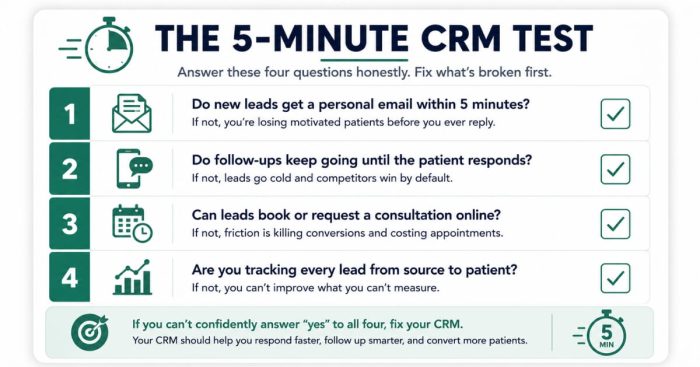
A CRM that fails this test doesn’t just cost you the monthly subscription.
It also costs every lead that leaks while the “real setup” remains on the someday list.
That’s the expensive part because a patient acquisition machine only works when every inquiry actually lands in it.
Why do enterprise CRMs fail at small medical practices?
Because they’re staffed products sold to unstaffed buyers.
The gap between the demo and your Tuesday is a job role your clinic doesn’t have.
Enterprise CRMs assume someone’s full-time job is managing the CRM.
At a five-to-fifteen-person clinic, that person is usually also running the front desk or managing the entire practice.
As a result, the half-configured system becomes the real system.
Leads end up scattered across:
- The CRM
- A spreadsheet
- Text messages
Staff begin working around the software instead of inside it.
Eventually, the owner starts resenting the monthly subscription.
We’ve seen clinics handle serious growth the opposite way.
That level of growth only survives when the follow-up system is simple enough for your actual team to run.
What’s the “blank CRM” trap when shopping for clinic software?
The demo is fully furnished.
Your account is completely empty.
The owner on our call had just experienced exactly that.
She signed up for a promising newer CRM.
She attended the 20-minute onboarding Zoom.
Then she logged in and realized, in her own words:
“It’s still blank.”
This is the part nobody warns clinic owners about.
The screenshots and guided tour display a system full of pipelines, automations, and dashboards.
However, what you receive on day one is a blank canvas.
When you ask how it gets filled, the answer is simple:
You build it.
Every pipeline stage.
Every automation.
Every form.
Every workflow.
Some vendors sell that blankness as flexibility.
For a busy clinic owner, blankness is simply unbuilt work with a login.
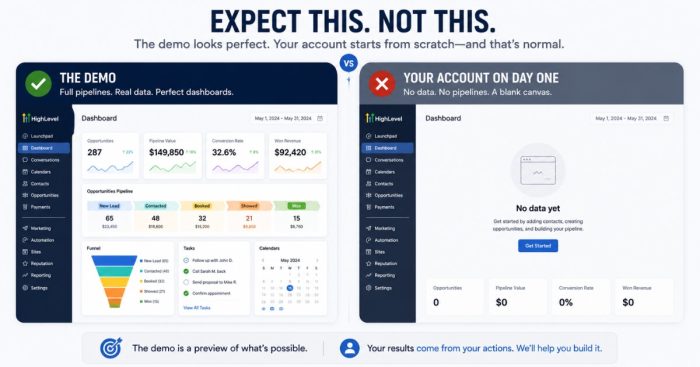
When you’re evaluating a CRM, ignore the tour.
Instead, ask one question:
What will my account actually look like on day three, and who built what’s inside it?
If the answer is “whatever you’ve built,” then you didn’t buy a system.
You bought a kit.
What CRM do we actually use with cash-pay clinics?
GoHighLevel.
As we told the owner on that call:
“I like to use one called GoHighLevel.”
Why?
Because it passes the user-friendliness test that HubSpot and Salesforce usually fail for a clinic-sized team.
GoHighLevel includes native features such as:
- Pipelines
- Two-way texting
- Missed-call text-back
- Booking calendars
- Follow-up automation
These features are ready to use.
They don’t require extensive build-outs.
That matters even more in high-LTV specialties like hormone therapy.
A membership patient can be worth a four-figure monthly relationship.
A leaked lead is extremely expensive.
The machinery behind effective men’s hormone clinic marketing depends on speed-to-lead and relentless follow-up.
That only happens when turning those features on takes minutes instead of weeks.
We also set clients up with GoHighLevel accounts during onboarding.
As a result, nobody is left staring at a blank canvas alone.
There is one honest caveat.
No software is magic.
GoHighLevel with nobody assigned to manage the pipeline fails just as quickly as Salesforce with nobody assigned to build it.
The right tool removes the technical excuse.
The operating discipline still has to exist.
What about integrations with my booking or EMR software?
Prefer native features whenever possible.
Treat every integration as a potential future failure point.
When an integration is unavoidable, a simple Zapier connection is usually a better choice than a custom API build.
The owner on our call wanted her CRM connected to Boulevard, her booking platform.
The practical answer was a Zapier automation rather than a native integration.
That’s perfectly acceptable.
The mistake is designing your entire operation around multiple tools constantly passing data back and forth.
Every connection becomes another point that can silently fail.
Follow this hierarchy:
- Do it natively inside the CRM whenever possible.
- Use one simple Zapier connection when necessary.
- Be extremely cautious of any clinic-sized solution that requires a custom API integration.
Every workflow you keep inside one platform is a workflow that can’t break between two systems.
FAQ’s About Choosing a CRM for a Cash-Pay Clinic
Is HubSpot too expensive for a medical practice?
Price isn’t the real issue.
The real issue is capability overhead.
Most cash-pay clinics can afford the subscription.
What they can’t afford is the administrator, consultant, or API build-out required for every new workflow.
A CRM where the owner can personally toggle features on will usually deliver more real functionality than a more powerful platform that remains half configured.
What’s actually wrong with Salesforce for a small clinic?
Salesforce assumes someone’s full-time job is administering Salesforce.
At a clinic-sized practice, that person usually doesn’t exist.
As a result, pipelines, automations, and reports remain unfinished.
Staff begin working around the software instead of inside it.
It’s a staffed product sold to an unstaffed buyer.
Powerful in theory.
Blank in practice.
Does my CRM need to integrate with my booking software or EMR?
Prefer native features first.
If an integration is necessary, use a single, simple Zapier connection whenever possible.
That’s usually the most practical solution for connecting a CRM to a booking platform like Boulevard.
Avoid systems that depend on long chains of connected tools.
Also be cautious of any clinic-sized implementation that requires a custom API integration.
Every additional connection creates another potential failure point.
What does a “user-friendly” CRM actually mean?
A competent non-technical user should be able to operate most of the platform independently.
That includes being able to:
- Build a pipeline stage without documentation
- Turn on follow-up sequences with a simple toggle
- Let the front desk view today’s leads without creating a custom report
If every new feature requires talking to the vendor’s solutions team, the CRM fails the test.
Can I switch CRMs later if I pick the simple one now?
Yes.
Contact lists, pipelines, and automations can all be migrated.
Clinics do it routinely.
The more expensive mistake is spending years on an enterprise platform whose capabilities never get built.
Choose the platform your team can successfully operate today.
Upgrade only if you genuinely outgrow it.
What’s the next step?
If your leads currently live across a partially configured CRM, a spreadsheet, and your front desk’s memory, the solution isn’t a more impressive platform.
It’s a system your actual team can run.
One that’s fully switched on this month.
One where follow-up happens whether someone remembers or not.
Book a free strategy call.
We’ll review your current lead flow together.
We’ll identify:
- What should run natively
- What should be connected with a simple bridge
- What a fully switched-on pipeline could do for your consult volume