
How a Cash-Pay Clinic Protects Its Facebook Ad Account Before It Gets Shut Down (6-Point Resilience Checklist)
Every cash-pay clinic running Meta ads is one policy flag away from a dead patient pipeline. Unfortunately, most owners discover their Business Manager was fragile only after it stops working. The fix isn’t reactive appeals. Instead, it’s infrastructure you set up once, before the problem. Here’s the six-point resilience checklist, drawn from the same setup lesson we walk every ad client through.
Why do medical practices lose Facebook ad accounts more often than other businesses?
Because health advertising sits closer to Meta’s policy tripwires than almost any other category.
In addition, an unverified Business Manager gives the platform no reason to give you the benefit of the doubt.
Meta’s enforcement systems exist to catch bad actors.
For example, fake accounts created by bots often run ads for scams, elections, and other prohibited activities.
Those systems are automated.
As a result, they judge accounts by signals rather than intentions.
A clinic advertising hormones, weight loss, or regenerative treatments already triggers more sensitive reviews than a landscaping company.
Now combine that with an unverified Business Manager, one admin, and no linked domain.
To a robot, your clinic can look almost identical to the accounts Meta bans every day.
Verification changes that.
It tells Facebook you’re a legitimate business with a genuine intention to follow its policies.
That single signal influences how future reviews are handled.
This matters even more in high-risk healthcare categories.
Anyone doing serious GLP-1 & weight loss clinic marketing on Meta should treat the checklist below as part of the campaign rather than as routine IT work.
What does a verified Business Manager actually protect a clinic from?
It protects against three common failure modes:
- Total shutdown
- Radio silence
- Lockout
Here’s the logic from the setup lesson.
1. Shutdown insurance
A verified Business Manager can create multiple ad accounts.
Therefore, if one account gets shut down, you can create another without crippling the business.
Without verification, that safety net doesn’t exist.
The ad account effectively becomes the business.
2. A human to talk to
If Facebook flags your account, a verified Business Manager gives you access to live Meta support.
Without verification, that option simply isn’t available.
When booked consultations depend on paid ads, live support versus no support can make all the difference.
3. Legitimacy by default
Verification tells Meta’s review systems you’re a real business operating from a real location.
Consequently, borderline decisions are more likely to work in your favor.
The importance grows as your campaigns scale.
An orthopedic surgical practice we work with generated $2 million in revenue from Facebook ads.
Putting a seven-figure acquisition channel behind one fragile login simply isn’t worth the risk.
How do I make sure I can never be locked out of my own Business Manager?
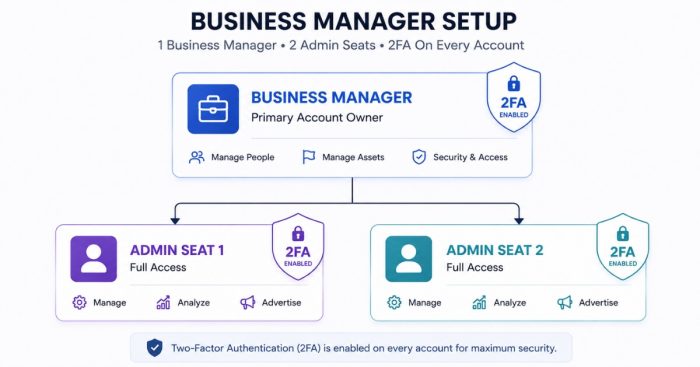
Use two admins.
Then enable two-factor authentication for both.
You can complete the setup in about five minutes under Business Settings → People.
The recommendation from the lesson is specific.
Add a second admin.
That person could be your spouse, partner, or another trusted business owner.
Lockouts happen for surprisingly ordinary reasons.
A phone gets lost.
A personal Facebook profile gets hacked.
Or Meta triggers an unexpected security review.
When only one admin exists, your Business Manager has a single point of failure.
Adding a second admin removes that risk.
Next, enable two-factor authentication for both users.
Meta increasingly requires 2FA anyway.
However, the order matters.
Create the second admin first.
Then activate 2FA for both accounts.
One additional detail matters just as much.
Always log in using the account that has ownership access to the clinic’s Facebook Page.
The Business Manager should remain connected to credentials controlled by the business.
It should never depend entirely on an employee’s personal Facebook profile.
What assets should be linked inside Business Settings before spending a dollar on ads?
Link three assets before launching campaigns:
- Your Facebook Page
- Your Instagram account
- Your website domain
Everything is managed inside Business Settings.
Open Settings, then select Business Settings.
1. Facebook Page
Open Pages.
Then request access to your business page so the Business Manager owns it instead of someone’s personal profile.
2. Instagram account
Open Instagram Accounts.
Sign in and connect the account.
Instagram placements depend on this connection.
Additionally, a linked account strengthens your legitimacy signals.
3. Website domain
Open Brand Safety.
Then verify your website domain.
This requires adding a small DNS record through your domain registrar, such as GoDaddy.
If DNS changes aren’t familiar, call the registrar.
Their support team can usually complete the process quickly.
Each linked asset serves two purposes.
First, it improves campaign performance through verified domains, tracking, and placements.
Second, it strengthens the evidence that your clinic is a legitimate business when Meta reviews future ads.
Clinics that skip these steps and rush into advertising build medical practice marketing on unstable infrastructure.
How do I pass Facebook business verification on the first try?
One word: consistency.
A robot reviews your submission.
Therefore, if the information doesn’t match everywhere, the verification is likely to fail.
The process is straightforward.
Open the menu in the lower-left corner.
Next, select Business Info.
Complete every field on the page.
Then click Begin Verification under Business Verification Status and follow the prompts.
At some point, Meta searches public business records.
You’ll be asked which listing belongs to your business.
Choose the listing with the most complete and accurate information.
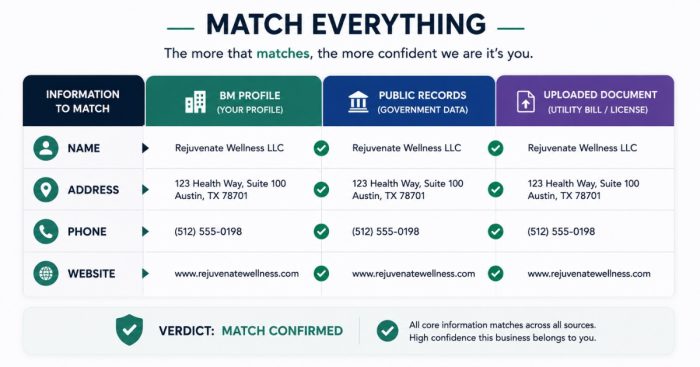
Consistency determines whether you pass.
Your business name, address, phone number, and website must match everywhere:
- Your Business Manager
- Public records
- Supporting documents
Be truthful throughout the process.
Only submit information you can verify with documentation.
Meta may request:
- A utility bill
- Articles of incorporation
- A bank statement showing the business address
The platform also provides a complete list of acceptable documents during verification.
After submission, approval usually takes five to seven days.
The process feels tedious.
However, that’s intentional.
When Meta first introduced verification, we completed it for roughly 40 businesses in a single week.
It wasn’t enjoyable.
Even so, it’s a one-time investment that creates a much stronger Business Manager.
Complete it before you need it.
The week your ads get flagged is the worst possible time to begin a seven-day verification process.
How should Business Manager access work when an agency runs my ads?
Give the agency partner access.
Run campaigns from your ad account.
Keep complete visibility into every dollar spent.
That’s the proper setup.
Business Manager was built so owners could share assets without giving away ownership.
The correct structure protects both the clinic and the agency.
Unfortunately, many clinics use the opposite setup.
The agency runs campaigns from its own ad account.
As a result, it controls the pixel, campaign history, and account trust.
If the relationship ends, the clinic starts over.
Even worse, if the agency loses its own advertising privileges because of another client, your campaigns can disappear too.
Instead, run every campaign from your own account.
That gives you complete transparency.
You’ll always be able to see:
- Every campaign
- Every ad
- Every dollar spent
- Every performance metric
There’s only one caution.
Once you’ve hired an agency, let them manage the campaigns.
Don’t log in and start changing settings.
Agencies dislike unexpected edits because they interrupt optimization and make troubleshooting difficult.
Monitoring the account is your right.
Changing campaigns mid-flight usually hurts performance and damages the working relationship.
Transparency matters.
NuLevel Wellness Medspa added $6,708,600 in one year on multi-channel paid ads.
Advertising at that scale only makes sense when the owner can audit every dollar inside an account they fully control.
FAQ’s About Protecting a Clinic’s Facebook Ad Account
How long does Facebook business verification take?
Approval typically takes five to seven days after submitting your documentation.
That’s why you should complete verification before you need it.
Starting the process after your ads get flagged can leave your lead pipeline idle for a full week.
What documents does Meta accept for business verification?
Meta commonly accepts:
- Utility bills
- Articles of incorporation
- Bank statements showing the business address
The accepted document list appears during the verification process.
Whatever you upload must exactly match the business name, address, and phone number you entered.
Should my agency run ads from their ad account or from mine?
Always run campaigns from your own ad account.
Share Business Manager access with the agency.
That way, they can manage campaigns while you retain ownership of your account, pixel, campaign history, and spending data.
You’ll also maintain complete visibility into everything they do.
What happens if my ad account gets shut down anyway?
A verified Business Manager gives you two important lifelines.
First, you can contact Meta through live chat support.
Second, you can create another ad account under the same Business Manager.
Without verification, you typically have neither option.
Who should be the second admin on my Business Manager?
Choose someone you trust who isn’t responsible for day-to-day advertising.
The lesson recommends a spouse or business partner.
Their role isn’t to manage campaigns.
Instead, they serve as a secure backup with two-factor authentication enabled in case the primary admin loses access.
What’s the next step?
If your clinic’s entire advertising system depends on one login, one administrator, and an unverified Business Manager, you don’t have an ad strategy.
You have a single point of failure.
Book a strategy call.
In 60 minutes, we’ll audit your Business Manager against this checklist, strengthen the weak points, and map the Meta advertising structure your clinic needs before the next policy flag arrives.