
Should My Clinic Replace Its Phone System With the CRM’s Built-In Phone? (Dialpad vs. GoHighLevel for a Cash-Pay Practice)
A functional medicine clinic in Florida was paying almost $300 a month for seven Dialpad lines — and not one of those calls ever touched a patient record.
Meanwhile, 46 warm leads had quietly piled up in the CRM’s “in contact” stage over two months with no callback rule.
On one consulting call we mapped the fix: collapse the phone system into the CRM, so every call, text, transfer, and recording lands on the contact timeline.
Here’s the FAQ on whether — and how — to make that move at your practice.
Should my clinic use its CRM as the phone system instead of Dialpad?
Yes, once each staff member has their own CRM account — because the win isn’t the phone bill, it’s that every call gets captured.
The clinic in this story had “seven lines on Dialpad… almost $300” a month.
The real cost wasn’t the subscription.
Calls happened in a system disconnected from the patient record, so nobody could see who called whom, when, or what was said.
Consolidating into the CRM’s phone means missed calls, inbound calls, and recordings appear on the contact right next to texts and emails.
“It all gets captured… you’re not missing anything in Dialpad.”
The prerequisite is real, though.
Don’t cut over until every staffer has an individual CRM login and a headset.
Keep the old lines forwarding during the transition.
The rollout is a sequence, not a switch-flip.
Is a CRM phone system HIPAA compliant?
Verify it for your specific platform — this clinic asked the question directly on the call, and the answer for GoHighLevel was yes.
“GoHighLevel is HIPAA compliant, right? Yes… We got the little badge.”
And that badge isn’t free: the compliance add-on runs about $600 a month on our own account.
The point isn’t the brand.
It’s the diligence.
Before any patient communication moves into a new system, get the compliance answer in writing for the exact plan you’re buying.
A cheap phone consolidation that creates a compliance gap is not cheap.
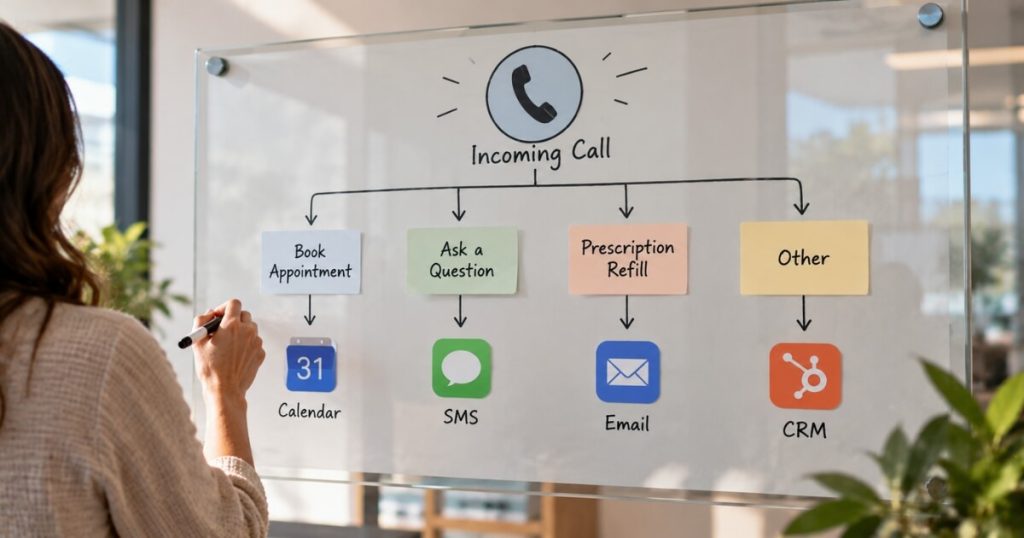
Can I set up a phone tree in my clinic CRM?
Yes.
This clinic re-recorded its “press 1 for front desk, press 2 for medical” Dialpad greetings as a CRM phone tree routing to specific staff.
“I like a phone tree, personally… We can do that in HighLevel.”
The phone tree is what makes one tracked number behave like seven untracked ones.
Patients still reach the right person, but now the routing, the wait, and the outcome are all logged.
Skip the enterprise phone-system pricing.
The CRM you already pay for does the job and writes it all down.
What happens to call transfers if the staff member isn’t at a desk?
The transfer rings their mobile app — and the caller never sees the personal number.
This was the owner’s real worry: a lean team, staff moving between rooms, and nobody wanting patients to have their personal cell.
In the CRM setup, a transfer rings the staff member’s app.
“It’s not like the customer gets your phone number.”
The call still logs to the patient record regardless of which device answered it.
That’s the difference between a phone system and a communication record.
One connects audio, while the other builds an asset your whole patient acquisition operation can run on.
How fast should we call back a lead who said “let me talk to my spouse”?
Forty-eight hours.
“All of those situations are 48-hour turnarounds.”
The soft-maybe lead — talk to my spouse, check my schedule, think it over — is where cash-pay pipelines quietly die.
This clinic had 46 leads sitting in “in contact” accumulated over just two months because nothing forced a next touch.
The rule from the call: every soft maybe gets a callback inside 48 hours.
Only an explicit “I’ll call you next week” earns longer.
Context for why it mattered: the clinic had booked 10 appointments in August and 15 in September, with a close rate above 50%.
The leads converted when someone actually got back to them.
How do I make sure staff actually make those callbacks?
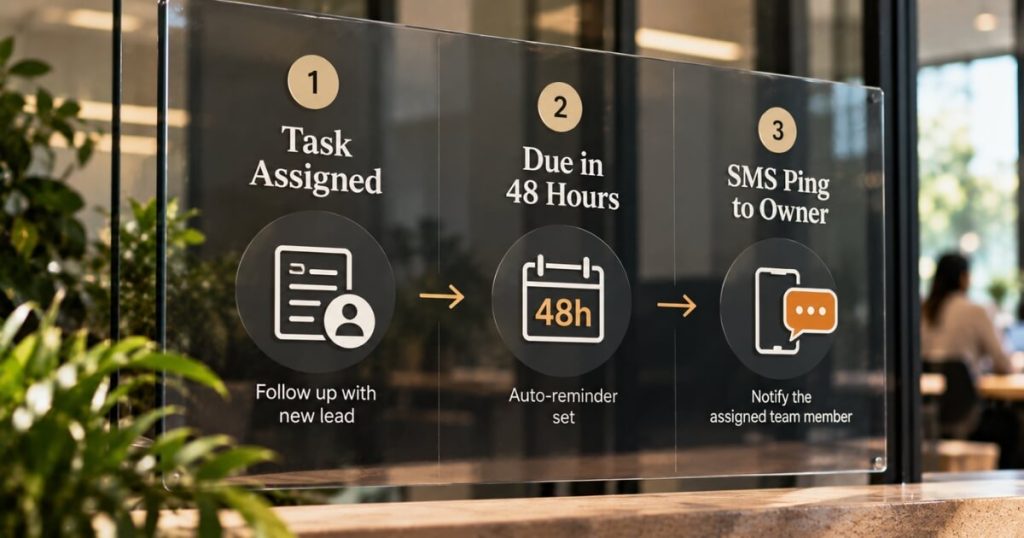
Assign a task with a due date to a named person — and trigger an SMS reminder when it comes due.
A task nobody owns is a wish.
The build from this call: each callback becomes a CRM task with an assignee and a due date.
Then, an automation pings the assignee by text when it’s due, filtered so each person is only notified about their own tasks.
Pair that with the consolidated phone, and the loop closes.
The reminder fires, the call happens in the CRM, the recording lands on the record, and the pipeline stage moves.
This is the same operating discipline behind the regenerative practice we work with that books 79.4% of its leads into appointments — conversion is a system property, not a personality trait.
FAQ’s About Running Clinic Phones Through the CRM
What does a standalone clinic phone system typically cost?
This clinic paid almost $300 a month for seven Dialpad lines.
The CRM phone replaced it with usage-based calling on a number the practice already owned.
But the bigger saving was operational: no more untracked calls.
Do I have to move all lines to the CRM at once?
No — and you shouldn’t.
Keep the old system forwarding until every staff member has an individual CRM account and a headset.
Then cut over line by line.
Why do individual staff logins matter for a clinic phone system?
Attribution and coaching.
Each call and text is stamped with who handled it, and recordings become training material.
Those same recordings later onboard your first dedicated sales hire.
Will patients notice the switch?
They shouldn’t.
The phone tree reproduces the same “press 1 / press 2” routing they’re used to, and transfers ring staff apps invisibly.
What changes is on your side: every interaction now exists on the patient record.
What’s the single rule that stops warm leads from rotting in the pipeline?
The 48-hour rule.
Any lead in a soft-maybe state gets a scheduled, task-assigned touch within 48 hours.
An SMS reminder to the task owner enforces the rule, not memory.
What’s the next step?
If your calls live in one system and your patients live in another, you’re running a practice on evidence you’re throwing away daily.
Book a strategy call.
In 60 minutes we’ll map your current lines, design the CRM phone tree and transfer flow for your team size, and set up the 48-hour callback system.
That way, the next “let me talk to my spouse” actually turns into a booking.