
Should My Cash-Pay Clinic Build a Branded Patient App? (The Fix for Portal–Calendar–Consent Chaos)
On a strategy call with a women’s hormone clinic, the physician-owner described her patient tech stack with surgical honesty: you can’t book a visit from the patient portal — you book from the calendar site. But you can’t get your records from the calendar site — those live in the portal. Consents live in a third place, and they only trigger when an encounter is created, “which may or may not be happening.” Her summary: “We’re literally using the EMR as a stashing station for notes.” The fix we started that same call: a branded patient app. Here’s the FAQ.
Why does my clinic’s patient experience feel so fragmented?
Because each tool in your stack was purchased to solve a staff problem, and nobody ever designed the patient’s side of it.
The clinic on this call is typical.
An EMR patient portal stores records and notes.
A separate calendar website handles scheduling.
Consent forms trigger from the EMR’s encounter logic.
Meanwhile, a CRM manages payments.
Every tool works individually.
However, the patient experiences the seams.
They log in to one system for records, another for appointments, and a third for consent forms whenever the system remembers to send them.
The staff experiences those same frustrations.
The owner admitted she often looks up patient addresses in the portal because patients don’t maintain an account they actually use.
Until someone purchases a service, the team doesn’t even know whether they’re located in Florida or another state the clinic serves.
The most dangerous seam involves consent forms.
In this setup, consent documents only trigger when an encounter is created.
Sometimes the encounter is created.
Sometimes it isn’t.
As a result, the consent forms may or may not be sent before the visit.
The clinic still sees the patient because patient care comes first.
As the owner put it, “signed consents or left me hanging to be sued, doesn’t matter, we’re going to see them.”
That statement should concern every practice owner.
Not because the clinic is careless, but because compliance depends on luck instead of process.
What is a branded patient app, and what should it actually do?
One login, under your clinic’s name and logo, where patients complete intake, sign consents, view their information, schedule appointments, and manage their membership.
The guiding principle is simple.
The app becomes the patient’s single front door, replacing the portal-calendar-consent scavenger hunt.
Behind the scenes, everything lives inside one patient account.
Health history.
Pharmacy information.
Consent forms.
Documents.
Both the patient and your team can view and update that information instead of chasing it across multiple systems.
This clinic had already built the community and client portal inside its CRM.
The branded mobile app simply wrapped those features inside the clinic’s own branding on the patient’s home screen.
Notice what this does for a membership practice.
A patient who has your clinic’s icon on their phone, their progress in their pocket, and one obvious place to schedule care is structurally harder to lose than someone trying to remember three different websites.
The clinics with the strongest retention consistently invest in experience infrastructure.
That’s the same reason an HRT clinic we work with sustains 250 active members at $1,000 a month.
The relationship is systematized, not improvised.
What should the app capture at the very first call?
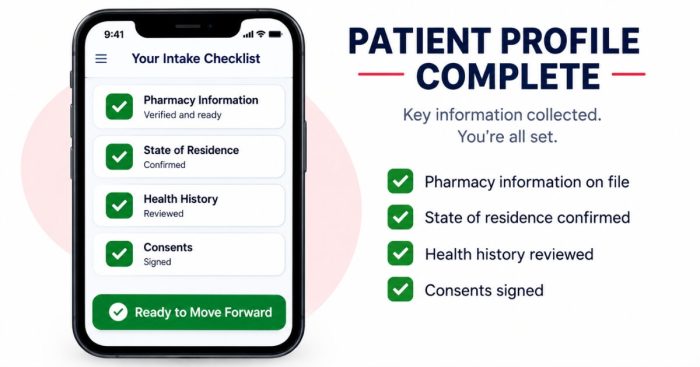
Everything that currently creates delays later: pharmacy information, state of residence, health history, and signed consent forms.
Trigger the process the moment a new lead enters the coordinator’s pipeline.
The workflow we mapped was straightforward.
As soon as a new lead enters the pipeline and the coordinator makes the first call, begin collecting information.
Capture pharmacy details so prescriptions don’t stall during the first refill.
Collect insurance information when applicable.
Complete health history and consent forms inside the patient’s own account.
For telehealth practices, confirm state of residence immediately.
That’s the unglamorous qualification step that prevents everyone from wasting time because telehealth providers can legally treat patients only in licensed states.
This clinic sometimes didn’t discover a patient’s location until the payment stage.
Front-loading intake accomplishes two important goals.
Operationally, it eliminates delays between “patient paid” and “patient treated.”
Commercially, completing intake becomes a commitment device.
A lead who has completed their medical history and signed consent forms has already invested effort into becoming your patient.
That’s exactly the momentum a strong patient acquisition process should create before the first appointment.
Do I need custom app development to get a branded patient app?
No.
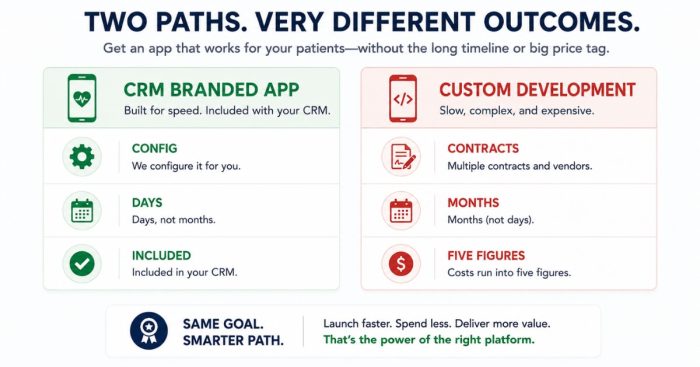
Modern clinic CRMs include white-label branded mobile apps that you configure rather than custom-build.
On this call, the “build” was literally navigating through the CRM:
Sites → Client Portal → Branded Mobile App → Step 2.
The clinic’s CRM — GoHighLevel in this case — already contained the community, client portal, forms, payment processing, and automation.
The branded app simply packages those capabilities behind the clinic’s own icon in the app stores.
No software development contract.
No five-figure project.
No months of waiting.
The owner went from “we haven’t started” to “I’m actually feeling pretty good about this” in about ten minutes of screen sharing.
The same call also included an important caveat.
Expect to configure workflows creatively to accomplish exactly what you want.
A white-label app usually delivers an 80% fit out of the box, and thoughtful workflow design covers most of the remaining 20%.
That trade-off — an 80% fit today at almost no additional cost, improved every week — is far better for most practices than waiting a year for a perfect custom application.
Should the app replace my EMR and patient portal?
No.
Your EMR should remain the clinical system of record.
The app replaces the patient-facing chaos, not the medical chart.
The division of responsibilities is straightforward.
The EMR continues managing clinical notes, prescriptions, and chart integrity because that’s what it’s designed and regulated to do.
The branded app owns everything the patient interacts with:
- Intake forms
- Consent forms
- Appointment booking
- Membership billing
- Secure messaging
- Patient education
What you’re eliminating is the middle ground where this clinic found itself.
The EMR had become little more than “a stashing station for notes.”
Patients ignored the portal.
Consent logic depended on encounter events that didn’t consistently trigger.
Instead, route consent forms through the app immediately after every purchase.
That way, every patient automatically completes the required documentation regardless of how the EMR handles encounter creation.
One operational recommendation matters just as much.
Don’t treat the migration as a side project.
Choose a defined transition point — this clinic paired it with updating printed materials to a new .com domain — and move intake, consent forms, and appointment booking into the app together.
That prevents staff from remembering which patients belong in which workflow.
Half-completed migrations simply create a third system everyone has to check.
That’s how medical practice marketing ends up promising an experience that operations can’t consistently deliver.
FAQ’s About Branded Patient Apps for Cash-Pay Clinics
What problems does a branded patient app solve for a clinic?
It eliminates fragmentation.
Instead of records in one portal, booking on another website, and consent forms triggered unreliably through EMR encounter logic, patients receive one branded login for intake, consent forms, records access, appointment scheduling, and membership management.
Staff also gain one complete patient account instead of chasing information across multiple systems.
How much does a branded clinic app cost to build?
If your CRM includes a white-label application, such as GoHighLevel’s Client Portal, you’re configuring software rather than building it.
That capability is typically included in, or added inexpensively to, your existing subscription.
Custom application development, by comparison, often costs five figures and requires months of development, making it unnecessary for most practices.
When should intake and consent forms be sent to a new patient?
Immediately after a new lead enters your pipeline and receives the first coordinator call.
Collect pharmacy information, state of residence, health history, and signed consent forms before the visit.
Front-loading this process removes treatment delays, closes compliance gaps caused by encounter-triggered forms, and increases patient commitment before the first appointment.
Does a patient app replace the EMR?
No.
The EMR remains the clinical system of record for notes, prescriptions, and medical documentation.
The app becomes the patient-facing layer where patients complete intake, manage appointments, communicate with the clinic, and access membership services.
Its primary purpose is preventing the EMR from being misused as both a poor patient portal and a “stashing station for notes.”
What’s the next step?
If your patients currently need three different logins just to receive care — and your consent forms depend on luck instead of automation — book a strategy call.
In 60 minutes we’ll map your existing portal, calendar, and consent workflow, show you what a branded patient app looks like inside your CRM, and create a migration plan that moves intake, consent forms, and appointment booking into one seamless patient experience without disrupting your schedule.