
How Do I Automate Follow-Up for a 6-Month Patient Program? (And When to Send Prep Emails If You Have a 4-Week Wait List)
Most clinics try to automate a patient program by writing emails first. That’s backwards, and it’s why the sequences end up firing at the wrong time to the wrong people. The order that works is: name the stages, define what has to happen in each gap, then attach automations. Here’s the FAQ on building that architecture — including the send-timing rule almost nobody gets right when there’s a wait list between enrollment and the first visit.
How do I map a six-month patient program into CRM pipeline stages?
Name a stage for every point where the patient’s status genuinely changes.
Then build the automations off the stage move rather than off a date.
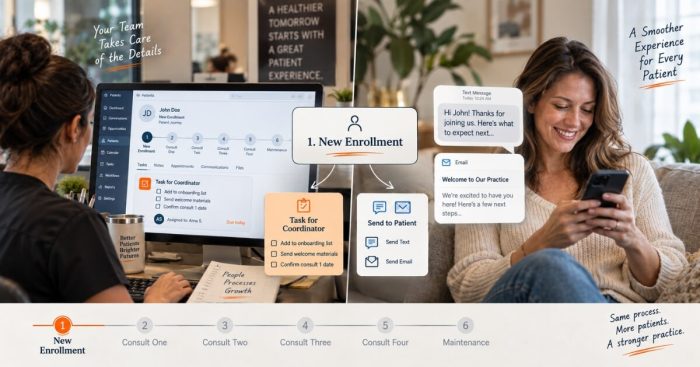
For the functional medicine and longevity practice we did this with, the pipeline came out as six named stages: new enrollment, consult one, consult two, consult three, consult four, and maintenance.
That list is the entire foundation.
As we put it on the call, “we can build automations and triggers based off of somebody was moved to new membership.”
The stage change becomes the event, and everything downstream hangs off it.
Staff move a card. The system handles the next steps.
Starting here rather than with copy also forces you to be honest about your own arithmetic.
Six months is 24 to 25 weeks.
This program has four 30-minute consults spaced six weeks apart. That places the stage markers at weeks 0, 6, 12, 18, and 24 — not at monthly intervals.
A program sold as “four visits over six months” is not a monthly program.
Build the automation on a monthly rhythm and every message after the first arrives at a moment that doesn’t correspond to anything happening in the patient’s care.
So do the math before you write a word.
Count the weeks, place the visits, and write the stage names down in order.
If two stages can’t be distinguished by something a staff member could point at, you have one stage, not two.
What should fire automatically at each stage of a patient program?
Two things at every stage: a staff task and a patient message.
The task gets assigned automatically. The message either prepares the patient for what’s coming or follows up on what just happened.
The design goal is to remove human memory from the follow-up loop entirely.
In the owner’s words on that call:
“what I’d like to do is automate a task to be assigned so [the coordinator] doesn’t have to remember… and then automate texts and emails at every one of these phases about like prep them for their upcoming consult, what’s going to happen, and then follow up stuff.”
That’s the whole pattern.
Your team gets the task. The patient gets the message.
Neither should depend on someone noticing that six weeks have passed.
Before writing any of the copy, every gap between two stages has to answer four questions:
- What is being said?
- What are we checking in on?
- What is the goal of the checking in?
- What happens next?
Run those four questions against the space between consult one and consult two.
Then repeat the process between consult two and three, and so on.
Most half-built automations we inherit fail the third question.
They check in without a goal, so the messages read like filler and get ignored.
The output is a grid: one row per gap and four columns.
Only after that do you write the message.
It usually takes one working session.
However, that session is the difference between a sequence that moves patients forward and one that merely proves you have software.
When should I send new patient education emails if I have a wait list?
Trigger the pre-visit email off the wait list, not off the booking date.
Send it so it lands about a week before the appointment, not the day the patient enrolls.
This is one of the most useful things that came out of that call, and almost nobody does it.
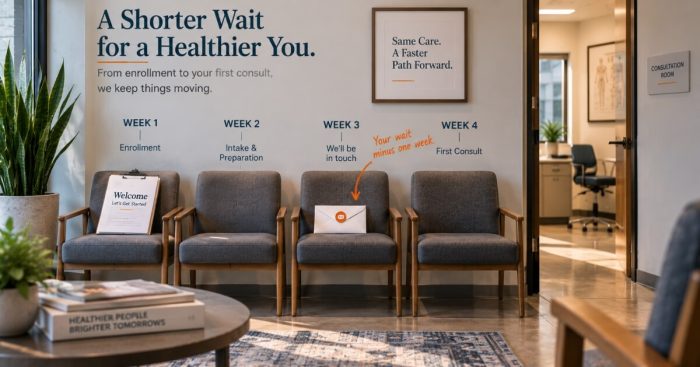
The practice had roughly a four-week wait between enrollment and the first consult.
The instinct is to send the welcome-and-prepare email immediately while enthusiasm is high.
But as we said on the call, an email fired at booking “is going to get lost in their email.”
It arrives 28 days before it’s relevant, gets skimmed once, and disappears by the time it matters.
A delayed trigger solves the problem.
In this build, the patient enters a “pending paperwork completion” stage at enrollment.
Three weeks later, the pre-visit education email fires.
With a four-week wait, that puts the message in the inbox about seven days before the appointment.
At that point, the patient is starting to think about the visit and can still act on anything you ask them to do.
Generalize it as a rule you can apply to any program.
The trigger delay for pre-visit education is N weeks minus one, where N is your actual current wait.
Treat N as a variable, not a constant.
If the wait drops to two weeks or stretches to six, the automation starts firing at the wrong moment.
Automations can keep running quietly even after the assumptions behind them have changed.
So put a recurring calendar reminder on re-checking the timing whenever your schedule shifts.
Should I send the doctor’s explainer video before or during the first consult?
Before.
If your physician has recorded an explainer, put it in the patient’s hands ahead of the appointment.
Don’t use live consult time to play it.
The line from the call was simple:
“it’d be even better if we could send that to them and have them watch it before the consultation as well.”
Anything the video covers is time the physician no longer has to spend explaining it live.
Inside a 30-minute consult, the difference between explaining the framework and applying it is most of the visit.
There’s another benefit that matters even more for conversion.
A patient who has already watched your physician explain their approach walks in having spent ten minutes with them.
The relationship starts before the room.
That’s also why the video belongs in the pre-visit email rather than the enrollment confirmation.
It’s the same asset, but timing changes whether it gets watched.
Send it a week out instead of a month out.
What happens to patients who don’t finish the program or don’t enroll in maintenance?
Build those paths explicitly because your pipeline will otherwise route them nowhere.
The question we asked on that call was deliberately blunt:
“would there be any other outliers? Like, didn’t finish program, didn’t enroll in maintenance?”
Almost every clinic builds only the happy path from enrollment through maintenance.
Then every patient who steps off that path simply stops existing inside the system.
No task. No message. No stage.
Nobody loses them on purpose. The pipeline loses them because nobody named the stage they belong in.
Give each outlier a stage of its own.
Then answer the same four questions for that stage.
A patient who didn’t complete the program needs a different check-in from someone who completed it and declined maintenance.
Both need something other than silence.
The point isn’t to chase them.
Instead, make sure the system knows they exist so a person can decide what happens next.
Practically, audit your pipeline for dead ends.
Look at every stage and ask what happens if the patient doesn’t advance.
If the answer is “the card just sits there,” that’s an outlier stage waiting to be built.
How do I get my front desk to collect the program fee up front?
Give them the stage, the moment, and one line to say.
Then let them refine the words themselves because the version they invent is usually the one they’ll actually use.
This works.
On the new front-end offer, the practice booked five patients in the first stretch and collected payment up front.
The most effective objection handler wasn’t written by us.
A staff member came up with it on her own:
“I’m giving you the kit to take home and everything. That costs money, so yes, we have to get the [front-end fee].”
It’s concrete and true.
More importantly, it reframes the charge as goods the patient is taking home rather than a deposit on something abstract.
Our coaching on that call was to treat those lines as a shared asset rather than individual talent:
“you will probably learn what will make them feel the most comfortable over time just through repetition… share with each other.”
Give the team a standing five minutes to swap what worked that week.
Then write the winners down.
Now you have a script library built from your own front desk, which beats anything handed down from a consultant.
One structural rule makes their job much easier: bundle, don’t itemize.
Instead of quoting the front-end fee and then adding “also you have to pay $650 for the supplements,” fold the supplements into the price.
Take something else out to make room.
Every extra line item creates another moment when the patient has to say yes.
It also creates another chance to say no.
FAQ’s About Automating a Six-Month Patient Program
How do I map a six-month patient program into CRM pipeline stages?
Name a stage for every point where the patient’s status genuinely changes.
Then trigger automations off the stage move rather than off a date.
A common structure is new enrollment, consult one, consult two, consult three, consult four, and maintenance.
Do the arithmetic first.
Six months is 24 to 25 weeks. Four consults spaced six weeks apart place the markers at weeks 0, 6, 12, 18, and 24 — not at monthly intervals.
What should be automated at each stage of a patient program?
Automate two things at every stage: a staff task and a patient message.
The system assigns the staff task so nobody has to remember it.
Meanwhile, the text or email either prepares the patient for the next consult or follows up on the previous one.
Before writing the copy, answer four questions for every gap between stages.
What is being said? What are we checking in on? What is the goal of the checking in? What happens next?
When should I send a pre-visit education email if patients wait weeks for their first appointment?
Time it to the wait, not the booking.
An email sent the day a patient enrolls may arrive weeks before it’s relevant and disappear in the inbox.
With a roughly four-week wait, trigger the email three weeks after the patient enters the pending-paperwork stage.
That puts it in the inbox about a week before the appointment.
The general rule is N weeks minus one, where N is your current wait.
Re-check the timing whenever the wait changes so the automation stays aligned with the actual schedule.
Should a clinic send the doctor’s explainer video before or during the first consult?
Before.
Anything the video covers saves live physician time.
That matters a great deal inside a 30-minute consult.
It also means the patient arrives having already spent time with the physician, so the relationship starts before the room.
Send the video in the pre-visit email about a week out rather than in the enrollment confirmation.
That timing makes it more relevant.
What should happen to patients who do not finish a program or do not enroll in maintenance?
Build explicit stages for them.
Most pipelines only model the happy path from enrollment to maintenance.
Patients who step off that path can disappear from the system with no task, message, or owner.
Give each outlier its own stage and answer the same four questions for it.
A patient who didn’t complete the program needs a different check-in from someone who completed it and declined maintenance.
What’s the next step?
If your program lives in your coordinator’s head and reminders go out when someone remembers, the fix isn’t more software.
It’s four hours of mapping: stages, gaps, four questions per gap, then automations.
Book a strategy call and we’ll build the pipeline with you — the stage names, what fires at each one, where the outlier paths go, and the send timing your current wait list actually calls for.