
New Patients vs. Existing Patients: How to Design Website Scheduling for a Cash-Pay Clinic (Without Breaking Your EHR)
Most clinic websites treat every visitor the same: one “Book Now” button, one scheduler, and one flow.
Then existing patients struggle through forms designed for strangers. Meanwhile, new patient leads disappear into an EHR where nobody can count them.
This article walks through a real website build for a multi-location cash-pay clinic.
We’ll cover the exact form logic, the speed-to-lead standard, and the EHR widget surprises that nearly broke the launch.
Should new and existing patients use the same online scheduler?
No.
New and existing patients have different jobs to do, and one scheduling flow can’t serve both effectively.
Existing patients need the fastest possible route to their patient portal.
Meanwhile, new patients need to be captured as leads before they schedule.
On the website build behind this article, the breakthrough was one simple question placed at the very top of the booking form:
“Are you an established patient?”
That question appeared before the patient’s name and every other field.
If someone answered yes, conditional logic hid the remaining fields.
Then, the website redirected them directly to the EHR’s patient portal, where scheduling was already automated.
If someone answered no, the form revealed the new-patient fields.
Those included contact information, the service they were interested in, and consent.
As a result, existing patients could skip unnecessary paperwork.
New patients, however, entered a trackable lead capture process that allowed the clinic to follow up.
One question created two clean paths.
That’s much better than forcing everyone through a single process that’s frustrating for existing members and ineffective at capturing new leads.
The clinic owner’s own experience as a patient reinforced this approach.
One of his biggest frustrations when booking appointments elsewhere was not being able to select a service.
He would arrive without knowing whether the provider was even appropriate for what he wanted.
That’s why the “What are you interested in?” field matters.
For new patients, service selection isn’t unnecessary friction.
It’s reassurance that the clinic understands their needs before they walk through the door.
Why should new patients go through your CRM instead of straight into the EHR scheduler?
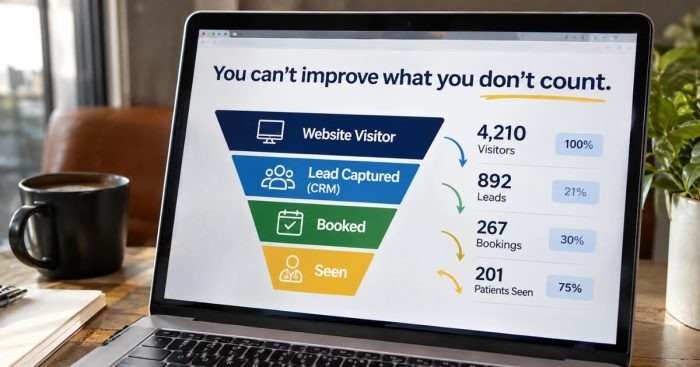
Because you can’t grow what you can’t count.
When your website captures new patient inquiries in a CRM, you can track the entire journey.
That includes how many leads arrive, how many book appointments, and how many actually show up.
But when those patients go directly into an EHR scheduler, much of that marketing visibility disappears.
The clinic in this article already had a functional EHR booking widget.
Naturally, using it for every visitor seemed like the easiest solution.
However, the problem became obvious during the planning call.
As we explained:
“We really want to be able to capture website leads so we can track productivity overall — how many leads, how many booked.”
That visibility is essential.
A new patient who enters through your CRM becomes a lead you can track and nurture.
If they don’t finish scheduling, your team can follow up.
You can also identify which marketing channel produced the inquiry.
But if that patient goes directly into the EHR, the appointment may appear without a clear connection to your marketing.
You lose visibility into which campaigns generated bookings.
Worse, you may never know how many people started the process but abandoned it.
That’s a serious problem when you’re trying to measure marketing performance.
You can only measure performance that precisely when every lead is countable.
However, capturing a lead shouldn’t make scheduling more difficult.
After the CRM records the inquiry, the website should immediately redirect the new patient to self-scheduling.
That way, the clinic gets the tracking it needs.
And the patient still gets the convenience of booking without waiting.
Lead capture and convenience aren’t enemies.
A properly designed scheduling flow delivers both.
How fast do website bookings need to be confirmed?
Within minutes.
The clinic in this article approved appointment requests in approximately two minutes.
And any process that introduces an 8-to-12-hour delay risks losing patients before they ever book.
During the planning call, the owner asked an important question.
Would routing new patients through the CRM delay their booking confirmation?
The answer was straightforward.
Yes, a delay would reduce conversions.
Speed to lead is massive.
So the design requirement became clear: preserve the instant booking experience.
New patients should enter their information, get captured in the CRM, and immediately move to self-scheduling.
Nothing should depend on a staff member manually approving the next step.
Think about what happens when someone visits your website at 9 PM.
They’re ready to book an appointment.
But your form only sends a request to the front desk.
Now they have to wait until the next morning for someone to respond.
By then, they may have already contacted another clinic.
That’s the invisible conversion cost of slow booking workflows.
If your team has to manually “input it into the schedule” before the patient receives confirmation, every inquiry faces unnecessary friction.
Instead, design the process so a website visitor can go from stranger to scheduled patient without waiting for your staff.
Whatever software you use, the standard remains the same.
Fast lead capture.
Immediate access to scheduling.
And a clear confirmation process.
That’s a fundamental requirement for an effective patient acquisition system.
Why do EHR scheduling widgets break when you launch a new website?
Because EHR platforms are often designed to keep important functions inside their own systems.
As a result, embedded scheduling tools may not work properly on an independently built website.
And pages hosted by the EHR under your clinic’s domain can break when your DNS settings change.
Two problems surfaced during this actual website build.
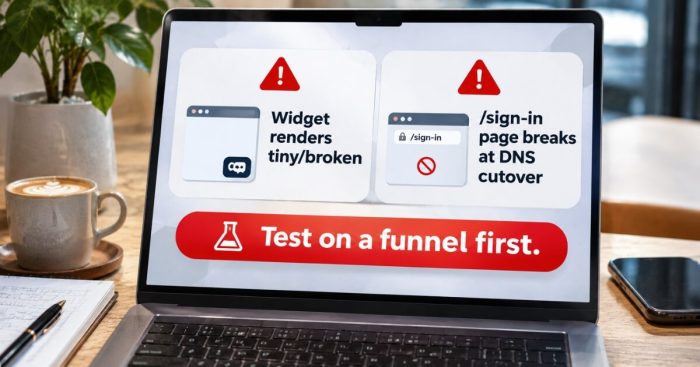
The first involved the official EHR scheduling widget.
We copied the provided embed code and placed it on the new website.
Instead of displaying a complete scheduler, it appeared as a tiny, broken box.
To make matters worse, the EHR restricted additional customization to an “advanced customers only” tier.
So the standard embed wasn’t working as expected.
And fixing its appearance wasn’t necessarily included in the clinic’s existing subscription.
The second problem was even more serious.
The clinic had an existing patient sign-in page located at /sign-in on its own domain.
At first glance, that looked like a normal page on the clinic’s website.
But the EHR actually hosted it.
That meant the page depended on the existing domain configuration.
Once the new website launched and the DNS records pointed to the new hosting environment, the old sign-in page could stop working.
Every existing patient who bookmarked that address would suddenly lose their usual route to the portal.
That’s a major operational problem.
And it’s easy to miss if nobody checks which systems actually host each page.
As we observed during the call, EHR vendors “have clearly built a sticky product.”
That doesn’t necessarily mean they’re intentionally making transitions difficult.
But their systems can create unexpected dependencies when you move to a new website.
So we established a practical launch protocol.
First, test the EHR widget on a standalone funnel page before changing anything on the live website.
Next, contact the EHR vendor if the embed doesn’t work.
One useful tip from the call: sometimes the sales department responds faster than support.
Then, identify every patient-facing page that depends on the current domain configuration.
Finally, schedule the DNS cutover during off-hours.
The suggested approach was simple:
“Go live at midnight and play with it for an hour.”
That gives the team time to test scheduling, portal access, and other critical functions before normal business hours.
A broken booking path is much easier to address during a quiet overnight launch than on a busy Monday morning.
Should you switch EHRs to get better scheduling and automation?
Only if the reporting and payment capabilities justify the change.
And if you decide to switch, run both systems in parallel for a month before fully committing.
The clinic in this article had already started moving toward a new EHR.
One of the main reasons was its ability to support content-drip programs.
However, the team eventually discovered that those automated content sequences could be handled through the CRM instead.
That changed the equation.
The new EHR was also creating reporting problems.
For example, the owner had to export an Excel spreadsheet just to see the day’s revenue.
That’s unnecessary friction for a practice that needs quick access to its financial performance.
So the clinic decided to reverse course.
Instead of continuing with the more complicated system, the team returned to a simpler, less expensive EHR.
The previous system also supported stored-card payments, which were already working.
But switching systems creates its own risks.
That’s why the transition plan included running both platforms in parallel for one month.
During that period, the team would enter data into both systems.
Yes, double data entry creates extra work.
However, it gives the practice time to confirm that scheduling, payments, and other essential functions work before shutting down the old system.
As we explained on the call:
“Measure twice, cut once.”
The bigger lesson is understanding what your EHR should actually do.
Choose an EHR for the functions that only the EHR needs to handle.
That includes clinical scheduling, documentation, payment processing, and reporting you can understand at a glance.
Meanwhile, let your CRM handle marketing, lead nurturing, and patient acquisition tracking.
Those systems should work together.
But they don’t need to perform the same jobs.
When you establish that division of responsibilities, your website becomes more than an online brochure.
It becomes a measurable revenue channel.
That’s the kind of structure behind successful cash-pay practices, like the HRT practice generating 40 website leads a month and $1.7M a year in memberships from SEO alone.
The goal isn’t to use the most complicated software.
It’s to build a system that makes scheduling easier, protects patient information, and gives your team the numbers needed to grow.
FAQ’s About Clinic Website Scheduling and EHR Integration
Should existing patients book through the website or the patient portal?
The patient portal.
Existing patients already have access to an established scheduling system.
So your website should give them the fastest possible route to that portal.
One effective approach is to place this question at the top of your booking form:
“Are you an established patient?”
If the visitor selects yes, hide the unnecessary form fields.
Then, redirect them directly to the EHR’s patient portal sign-in.
That eliminates repetitive paperwork and makes booking easier for returning patients.
Why capture new patient leads in a CRM before the EHR?
Because your CRM lets you track leads, bookings, and no-shows by marketing source.
Without that visibility, it’s difficult to understand which campaigns are producing actual patients.
If someone goes directly into the EHR scheduler, their appointment may not connect to your marketing reports.
You also lose the ability to follow up with people who started booking but never finished.
Instead, capture the new patient’s information in the CRM first.
Then, immediately redirect them to self-scheduling.
That gives your clinic accurate lead tracking without sacrificing convenience.
How quickly should a website booking be confirmed?
Within minutes.
The clinic in this article approved appointment requests in approximately two minutes.
However, a booking process that takes 8–12 hours can lose patients who are ready to schedule immediately.
That’s why confirmation shouldn’t depend on whether your front desk is available.
Instead, new patients should be able to submit their information and access scheduling right away.
If your current workflow requires manual staff intervention before patients can book, redesign the process.
Speed to lead directly affects your ability to convert website inquiries into appointments.
What breaks when a clinic launches a new website?
Any third-party service that depends on the old website or domain configuration.
That can include EHR patient sign-in pages, embedded scheduling widgets, and tracking links.
For example, the clinic in this article had a patient portal sign-in page hosted by its EHR under the clinic’s own domain.
Changing the DNS records could have broken that page immediately.
To avoid those problems, inventory every third-party page and integration before launching.
Test scheduling widgets on a standalone funnel page.
Then, schedule the website launch during off-hours.
That gives your team time to identify and fix problems before patients begin booking appointments.
What should new patients be asked when booking online?
Start by asking whether they’re a new or established patient.
That answer determines which scheduling path they should follow.
For new patients, collect their contact information, the service they’re interested in, and the necessary consent.
The service selection is especially important.
It helps the clinic understand what the patient wants before the appointment.
It also helps match the patient with the appropriate provider.
Rather than creating unnecessary friction, that question can make the booking experience more reassuring.
And it can shorten the first visit by giving the team useful information in advance.
What’s the next step?
If your website has one booking button for everyone, your scheduling process may be creating unnecessary friction.
And if you’re preparing to launch a new website without testing its EHR integrations, you could be risking your existing patient booking experience.
Book a strategy call with Real ADvice.
We’ll map separate scheduling flows for new and existing patients.
Then, we’ll connect your lead capture process so every website inquiry is countable.
We’ll also pressure-test the handoffs between your CRM, EHR, and website before launch.
That way, you can identify potential problems before launch night instead of discovering them after patients start complaining.