
My EHR’s Booking Widget Looks Terrible on My Website — Can I Replace It? (And What to Put There Instead)
A cash-pay telehealth practice we work with was two weeks from relaunching a 350-page website, and one element was holding the whole thing up: the scheduling widget its EHR provides.
It looked nothing like the rest of the site.
Nobody — not us, not their outside developers — could make it look like anything else.
Here’s the decision framework we used, why we ended up deleting it entirely, and what replaced it.
Can I restyle the booking widget my EHR gives me?
Usually not.
Most EHR scheduler embeds are served from the vendor’s own domain and ship with their styling locked. So no amount of custom CSS on your site touches them.
We tested this the honest way before advising the client.
We dropped the embed onto a second page, tried to style it, and looked at the result.
It looked bad.
Then we checked whether their outside developers could modify it.
They couldn’t either.
That’s not a skill gap — it’s how these embeds are built.
The vendor controls the rendering, and your site’s design system stops at the edge of the iframe.
Once you accept that, the question stops being “how do I make this pretty?”
Instead, it becomes a much better question: who is actually using this thing, and do they need it here?
Should I remove the EHR scheduler from my website entirely?
Decide by usage, not by design.
Look at who actually books through the embed. In most cash-pay practices, that’s new patients, while existing patients rebook by text or through the portal app.
That was the finding that settled it.
In this practice, nearly everyone using the website widget was a new patient.
Existing patients weren’t using it. They rebooked by text with a staff member or through the patient portal app.
More than half of them had the app installed.
So the widget was serving the audience it served worst.
New patients are forming a first impression, comparing you against two other clinics, and deciding in about ten seconds whether you look like a serious practice.
Those patients were being handed the ugliest element on the page.
Meanwhile, the patients who genuinely needed self-scheduling already had a better tool for it.
We initially considered a middle path.
We built conditional logic that asked, “are you an established patient?” The native widget appeared only to those who answered yes.
We built it, looked at it, and deleted it on the call.
It added a decision to the user’s path in order to preserve a tool that group wasn’t using anyway.
Complexity that protects an unused feature is just complexity.
The decision rule generalizes.
Keep the embed if your established patients genuinely self-schedule through the website and have no better path. Replace it if new patients are the primary users.
Building a predictable patient acquisition system means the first-touch experience gets your best asset, not your most locked-down one.
What should the replacement booking form actually collect — and what should it trigger?
Seven fields, and four automatic actions.
The fields are the easy part. The triggers are what make it worth doing.
The fields we used: first name, last name, phone, email, date of birth, service of interest, and location.
Nothing else.
Every additional field costs completions. Date of birth plus service of interest do most of the qualifying work.
The submission must trigger four things, all at once.
First, email the team directly — not the owner.
When form submissions route to the practice owner who then forwards them, you add hours to your response time. You also make your busiest person the bottleneck on your fastest-decaying asset.
Second, open a conversation thread in your CRM.
That way, the reply happens in the same system that holds the record and the phone number.
Third, create an opportunity in your pipeline.
The lead then becomes visible as work-in-progress rather than as an email somebody read.
Fourth — and this is the one clinics skip — fire a service-specific email campaign based on the “service of interest” answer.
Someone asking about weight loss should not receive your generic welcome sequence.
You already asked them what they want. Use the answer.

Should I put an AI chatbot on my clinic’s website instead?
In our experience, no.
A fast human response beats an AI chat for cash-pay patients. The chatbot often delays the handoff rather than accelerating it.
We have not found that an AI chat produces a better patient experience than a real reply arriving quickly.
High-consideration cash-pay decisions involve questions about price, candidacy, and risk. That includes hormone therapy, regenerative treatments, and a six-month weight loss program.
A bot that answers three of those and defers the fourth has usually spent the patient’s patience without earning the appointment.
The variable that actually predicts conversion is speed, and specifically speed from the person who can help.
A response that’s immediate but comes from someone who has to hand the patient off isn’t the same as an immediate response from the person who can book them.
Route to a human who can act.
Then instrument the notification so that human knows within seconds.
If your team can’t answer inside a few minutes during business hours, the honest fix is staffing or routing.
It’s not a bot layered on top of the same delay.
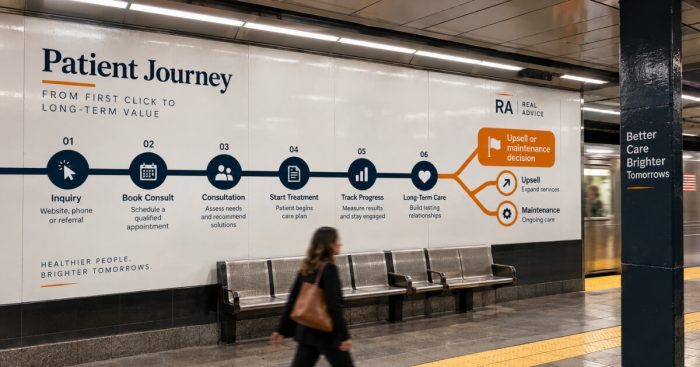
How should I stage a CRM pipeline for a program that runs six months?
Stage it by what the patient has completed, not by where they sit in your sales process.
And make the final stage a commercial decision point rather than an exit.
For a program where most patients hit their goal in about six months, the stages mirror the product.
First visit completed, due for second, second completed, and so on through the fifth, then maintenance.
Each stage change fires the outreach for that phase and creates a task assigned to a named person.
Two details matter more than the diagram.
First, staff-facing language stays staff-facing.
Internally, these may be “orders.” To the patient, it is always “your second visit.”
Never let internal vocabulary leak into a patient message.
Second, the last program stage is not the end of the relationship.
It’s the moment to offer maintenance or an adjacent service. Flag it as such rather than quietly closing it.
Cadence inside those stages should get lighter over time.
In month one, we run a welcome message on the stage change. Then comes a check-in at one week, another at two weeks, and a fourth at four weeks that invites them to schedule the next visit.
From month two on, drop the one-week message and keep the two-week and four-week touches.
The first month is the one that needs hand-holding.
After that, over-messaging trains people to ignore you.
Finally, set a staleness rule.
In this build, anything sitting more than 45 days in a “due for next visit” stage triggers a direct message and an overdue task.
Without that branch, a patient who quietly stalls simply disappears.
How do I add my existing patients to a new follow-up system without breaking every timer?
Enter each one at the stage matching what they’ve already completed.
And date the entry to their actual last visit — not to the day you imported them.
This is the single most common way a well-designed pipeline produces nonsense in week one.
A practice migrates 400 existing patients into a new system and drops them all in at today’s date.
Then every automation fires as though everyone started this morning.
Patients who are four months into a program receive a welcome message. Patients overdue by six weeks look current.
Do it the other way.
A patient who has completed three visits enters at “third visit completed,” dated to the day that visit happened.
Every downstream timer then calculates correctly.
The overdue ones also surface immediately. That’s exactly what you want because those are the patients with the highest chance of coming back.
One operational note: stages can be walked backward manually, but nothing reverses automatically.
Assume you will correct a handful of records by hand in the first week. Assign someone to do it rather than hoping the system self-heals.
A longevity and functional medicine practice we work with increased website leads by 900% and added 100+ inbound calls a month — volume like that is only survivable when every inbound lands in a pipeline with correct timers behind it.
FAQ’s About Replacing an EHR Booking Widget on a Clinic Website
Can I change the design of my EHR’s online scheduling widget?
Usually not.
Most EHR and practice-management scheduler embeds render from the vendor’s domain with locked styling. As a result, custom CSS on your own site has no effect.
Outside developers typically can’t modify them either.
Test it on a staging page before you plan a design around it.
If it can’t be styled, treat that as a fixed constraint rather than a problem to solve.
Should I delete the booking widget from my website?
Decide by who uses it.
If new patients are the primary users, replace it with your own branded form. They are forming a first impression and deserve your best page.
If established patients genuinely self-schedule through the website and have no better path, keep it.
However, consider isolating it on a page existing patients navigate to rather than putting it on your highest-traffic pages.
What should a clinic booking form collect?
First name, last name, phone, email, date of birth, service of interest, and location.
That’s enough to qualify and route without depressing completion rates.
The service-of-interest field is the most valuable one. It lets you trigger a treatment-specific follow-up sequence instead of a generic welcome email.
Is an AI chatbot better than a contact form for a medical practice website?
In our experience, no.
Cash-pay patients ask questions about price, candidacy, and risk that a bot usually can’t close.
So the chat spends the patient’s patience and then hands off anyway.
Speed from a person who can actually book the appointment converts better than an instant reply from something that can’t.
How do I migrate existing patients into a new CRM pipeline without triggering the wrong messages?
Enter each patient at the stage matching the visits they’ve already completed.
Then set the entry date to their actual last visit rather than the import date.
If you import everyone at today’s date, every timer recalculates from scratch.
Long-standing patients receive welcome messages, while overdue patients look current.
Expect to correct a few records manually and assign someone to do it.
What’s the next step?
If your website is being held hostage by a scheduling widget you can’t style, the fix isn’t a designer.
It’s deciding who that widget is really for, giving new patients an owned form that feeds your CRM, and building the pipeline that catches what the form produces.
On a 60-minute strategy call, we’ll audit your booking path end to end.
We’ll look at what the form collects, where the submission goes, who gets notified, and how fast they respond.
We’ll also determine whether your pipeline stages match how your program actually runs.
A pain and regenerative practice we work with added $2,095,039 in revenue in ten months on the back of exactly this kind of plumbing.