
Should My Concierge Practice Bill Memberships Through the EMR or the CRM? (What Breaks During Migration)
A concierge practice we consult for learned this one the hard way: someone edited membership prices inside the EMR, the EMR instantly pushed new invoices to existing patients, and the front desk fielded three calls in a day from members saying “wait — I just paid this, and you sent me another $400 invoice.” That call turned into a full billing migration: every membership moved out of the EMR and into the CRM, consolidated under one Stripe account. Here’s the FAQ on where membership billing should live and how to move it without breaking patient trust.
Should membership billing live in my EMR or my CRM?
In the CRM.
Billing is a business function, not a clinical one, and the CRM gives non-clinical team members the tools to manage it effectively.
The practical argument from this consulting call was straightforward.
Moving subscriptions into the CRM consolidates every payment into one Stripe account.
As a result, your team can see every transaction, subscription, renewal, and payment report in one place instead of checking multiple systems.
Payment links, SMS templates, and subscription management also live inside the same platform your staff already uses to communicate with patients.
Consequently, enrolling a new member becomes as simple as sending a text message rather than navigating an EMR workflow that only providers understand.
Your EMR is excellent at charting.
However, it’s usually mediocre at managing recurring revenue.
As this practice discovered, it can even become dangerous when billing workflows behave unexpectedly.
Do memberships transfer automatically when I switch billing systems?
No.
Your EMR and CRM are completely independent platforms, and they don’t share payment information.
Therefore, every active member must be enrolled again.
That surprises almost every practice owner.
There isn’t an import button for recurring subscriptions because the payment token remains with the original payment processor.
It doesn’t move with the patient record.
In this practice, 178 active memberships lived inside the EMR.
Consequently, the migration required creating payment links for every legitimate pricing tier and having each active member enroll through the appropriate link.
Rather than fighting that reality, plan for it.
First, build every payment link.
Next, write your SMS enrollment templates.
Then assign one owner, one timeline, and one finish line for the migration.
Fortunately, re-enrollment also creates an opportunity to clean up your billing.
During this audit, the clinic uncovered 45 past-due memberships.
Roughly 40 represented legitimate unpaid balances worth several thousand dollars in recoverable revenue.
As we pointed out during the call, if the new office manager collected nothing except those overdue balances, they’d likely pay for their own salary.
What happens if I edit membership prices inside the EMR during the migration?
The EMR may immediately generate invoices for existing members.
Because of that, freeze all pricing changes until the migration is complete.
This mistake is exactly what triggered the consulting call.
The owners updated membership pricing inside the EMR, believing the changes would apply only to new patients.
Instead, the EMR immediately pushed the new pricing to existing members.
Several patients had already paid.
Nevertheless, they received fresh $400 invoices.
The result was three confused and frustrated phone calls in a single day.
Each unnecessary invoice withdrew trust from relationships concierge practices work hard to build.
The rule that emerged from the experience is simple.
While members are being migrated, treat the legacy billing system as read-only.
Build all new pricing inside the CRM as new products.
Only after every member has been moved should anything inside the EMR be modified.
How do I migrate members who are grandfathered into old pricing?
Recreate every grandfathered rate as its own product inside the CRM.
Don’t use the migration as an excuse to quietly increase pricing.
In this practice, one physician’s patient panel remained almost entirely on the original $300 monthly membership while the current standard membership had already moved to $275.
Meanwhile, the family plan remained $400 per month.
The physician’s reasoning was simple.
“I feel like I’m committed to that number because that’s the number I gave them.”
Accordingly, the CRM included a dedicated $300 monthly membership alongside the newer $275 individual membership and the $400 family membership.
He also shared a story worth remembering.
While on vacation, two patients compared membership pricing in front of a mutual friend who was considering joining.
One paid $400.
The other paid $300.
Instead of changing the grandfathered rate, he honored the original promise.
That decision preserved trust and resulted in another new patient.
Migration is a systems project.
Pricing integrity is a relationship project.
Don’t let the first undermine the second.
How should a concierge practice price annual prepay during the move?
Keep annual memberships at roughly a 10% discount compared with twelve monthly payments.
Then rebuild the math whenever your monthly pricing changes.
The practice originally charged:
- $3,300 annually against the legacy $300 monthly membership.
- $4,400 annually for the family membership.
However, when the monthly individual membership dropped to $275, the existing $3,300 annual plan stopped being a discount.
After all, $275 multiplied by twelve equals exactly $3,300.
The solution created during the call was straightforward.
Build a new $3,000 annual membership that effectively gives members one month free while renewing automatically each year.
Migration creates the perfect opportunity to catch pricing drift like this.
Review every monthly and annual membership on one page.
Confirm that every annual option still delivers a genuine discount.
At the same time, remove unnecessary pricing complexity.
For example, this practice eliminated its couples plan because it duplicated the family membership at the same $400 price point and continually generated discount requests.
What does the actual migration process look like?
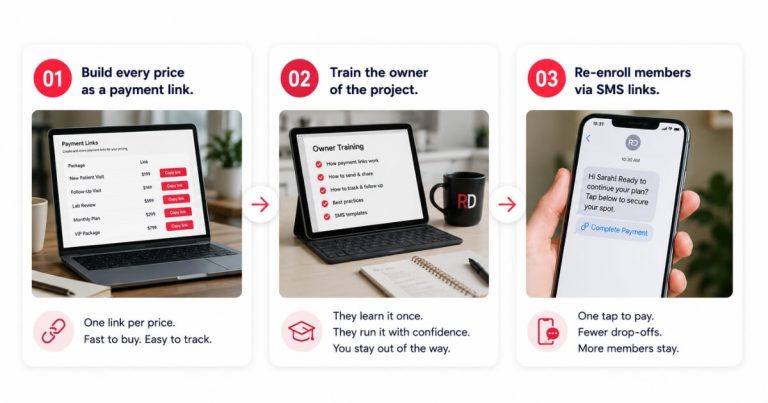
The process has three steps: build every payment link, assign one owner, and re-enroll every member through the CRM.
At the same time, move billing conversations off personal cell phones for good.
First, create a CRM product for every legitimate price point.
That includes current monthly memberships, grandfathered memberships, annual memberships, and any family plans.
Fortunately, creating those products only takes a few minutes.
Each product generates its own enrollment page, allowing patients to enroll themselves.
Next, train one office manager to own the migration.
Give them complete responsibility for re-enrolling every active member.
A clearly defined project with one owner and one finish line is far easier to complete than a shared responsibility that belongs to everyone.
Finally, send every enrollment link through the CRM using SMS templates.
Attach your pricing PDF to each message because the enrollment moment is often when patients explore the rest of your services.
Several patients discover additional programs simply by reviewing the pricing.
For example, they might say, “I didn’t realize you offered GLP-1s. Can you tell me more about that?”
There’s another important operational discipline.
Stop sending payment links from personal phones.
Everyone on this consulting call admitted they occasionally did it.
However, if billing conversations live inside providers’ text messages, an office manager can never fully take ownership of patient communication.
Recurring membership revenue should run through systems—not through someone’s personal device.
At one regenerative practice, that system included 102 memberships billed and tracked through the CRM.
An HRT clinic we work with maintains 250 active members at $1,000 a month because billing and patient communication operate through reliable systems rather than individual habits.
The same principle applies whether your memberships cost $275 or $1,000 per month.
The system—not the owner’s thumbs—should generate recurring revenue.
That’s also a core part of what we build through functional medicine & longevity clinic marketing engagements because retention only compounds when the operational foundation is dependable.
One final note deserves mentioning.
This consulting session didn’t cover failed-payment recovery, automated dunning, or card-updater tools.
Therefore, treat payment recovery workflows as a separate implementation project once every active member has been migrated successfully.
FAQ’s About Moving Membership Billing from the EMR to the CRM
Do memberships transfer automatically from an EMR like Elation to a CRM like GoHighLevel?
No.
The two platforms don’t share subscription or payment information.
As a result, every active member must complete enrollment again through a new CRM payment link.
Plan the migration as an operational project with one owner rather than expecting a simple data import.
Why move membership billing into the CRM at all?
Because it centralizes billing and makes delegation possible.
Every subscription, renewal, and transaction flows into one Stripe account with one reporting dashboard.
Likewise, enrollment happens through payment links and SMS templates that administrative staff can manage without provider involvement.
What’s the biggest mistake to avoid during a billing migration?
Don’t change pricing inside the EMR while members are still active there.
Doing so can immediately generate invoices for existing members, even if they recently paid.
Instead, freeze the legacy billing system until every membership has been successfully migrated into the CRM.
Should grandfathered members be repriced during the migration?
No.
Create separate CRM products for grandfathered pricing.
That approach honors the pricing originally promised to long-term members while preserving trust and referral relationships.
Migration is the wrong time to quietly increase someone’s membership fee.
Should staff send payment links from their personal phones?
No.
Every enrollment link should come from the CRM using standardized templates.
Doing so creates a complete communication record, allows office managers to manage the process, and removes billing responsibilities from providers’ personal devices.
What’s the next step?
If your memberships are currently scattered across an EMR, a card reader, and someone’s personal text messages, you don’t have a billing system.
You have a revenue leak.
Book a strategy call.
In 60 minutes we’ll review every membership tier, identify grandfathered pricing and annual-prepay issues before they become patient problems, and build the three-step migration plan your office manager can execute with confidence.