
Cost Per Lead vs. Cost Per Schedule for a Cash-Pay Medical Practice
The KPI Trap That Burns Out Your Front Desk
Most cash-pay practices pick one KPI — usually cost per lead — and chase it across every ad platform they run. However, that is the trap.
The right KPI is not universal.
Instead, it is:
- Per-platform
- Per-funnel
- Back-solved from your patient LTV
Get this wrong on Facebook and your front desk burns out chasing low-quality leads they cannot reach.
On the other hand, get it wrong on Google and you starve high-quality leads of the follow-up that would have converted them.
Built on what Anton learned across 40 of the fastest-growing cash-pay clinics in the country, the rule is simple — but most owners are still applying the same KPI to channels that behave nothing alike.
After running every major patient-acquisition channel across 40 of the fastest-growing cash-pay medical clinics in the country, this is the FAQ on:
- When to optimize for cost per lead
- When to optimize for cost per schedule
- How to back-solve the number that actually keeps your practice alive
What’s the difference between cost per lead (CPL) and cost per schedule (CPS) for a cash-pay medical practice — and why does picking the wrong one burn out your front desk?
Cost per lead is what you pay an ad platform to capture a form-fill or phone number.
Meanwhile, cost per schedule is what you pay to land a real calendar slot on the books.
Treating those two numbers as interchangeable is what burns out front-desk teams in cash-pay clinics.
A lead is a name and a number.
By comparison, a schedule is a human who has committed to a time — ideally with a credit card holding the slot.
Between those two events sits your front desk:
- Coordinators dialing
- Texting
- Leaving voicemails
- Re-engaging leads
When you optimize for cheap CPL on a platform that produces low-intent leads, volume goes up but the calendar does not.
As a result, your team spends the entire day chasing ghosts.
Eventually:
- They get burned out
- They start ignoring new leads
- The good leads get buried
- Conversions across every channel drop
The fix is not chasing one number harder.
Instead, the fix is recognizing that different platforms produce different intent levels.
Therefore, the KPI you optimize against has to match what that platform actually delivers.
Cheap CPL on Facebook is not the same asset as cheap CPL on Google.
One you can build a clinic on.
The other will quietly eat your team alive.
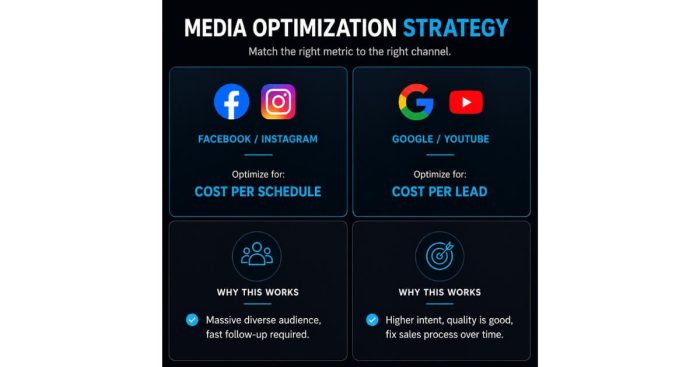
Why does Anton optimize for cost per SCHEDULE on Facebook and Instagram (and not cost per lead)?
On Facebook and Instagram, cost per schedule matters the most because the audience is massive and diverse.
As a result, most leads are not actively in-market, and only a booked, credit-card-held appointment proves the lead was real.
Facebook and Instagram are interruption channels.
A patient is scrolling, sees your audience callout, hits a quiz, hits a VSL, and only the people who are genuinely ready actually put a card down and grab a calendar slot.
Anything before that calendar action is noise.
Anton’s exact phrasing from the field notes:
“Cost per schedule matters the most to me here. I generally do these to a VSL and a quiz, with a calendar and a credit card to reserve the spot.”
That structure exists specifically because the platform produces a wide range of intent.
Therefore, the schedule step becomes the filter.
Why the $3,000 Front-End Cash Threshold Matters
This is also why a $3,000 front-end cash threshold matters on Facebook and Instagram.
If your offer is under $3,000 in front-end cash collected, the ad-spend math rarely closes.
In other words, you cannot pay a real CPS on Meta and still pull cash in as fast as you put it out.
As Anton puts it:
“Most of the time running these, you need cash in as fast as you’re putting it out.”
That economic reality is the reason the KPI has to be CPS.
Optimizing for CPL on Facebook just buys volume the front desk cannot service.
What Happens When Clinics Chase CPL on Meta
When clinics ignore this and chase CPL on Meta, the pattern becomes brutal and predictable.
We saw it solved cleanly at a pain management and regenerative medicine clinic where we added $2,095,039 in revenue in 10 months.
Importantly, the work was not:
“get more leads”
Instead, the work was rebuilding the funnel so cash-pay conversion ran on schedules, not lead-form submissions.
As a result, the front-desk team could finally focus on people who had actually committed to a time slot.
Why does Anton optimize for cost per LEAD on Google and YouTube (and not cost per schedule)?
On Google and YouTube, cost per lead is the KPI to optimize because the intent is already high.
Therefore, quality is generally good, so if you simply get the CPL down, the sales process can be improved over time without burning out the team.
Google and YouTube leads come from people who:
- Typed the treatment in by name
- Watched a long-form video about a specific condition
As a result, they are solution-aware or product-aware.
They already know what they want.
Anton’s own words from the field notes:
“for the cost per lead that’s what matters most to me here, I know quality is good generally so I can just fix the sales process over time if I can just get the cost per lead.”
That is the operating principle.
You buy the volume of qualified intent, then systematically improve:
- Show rates
- Close rates
- Offer presentation
How the Funnel Reflects This
The funnel reflects this approach directly.
On Google, the default is a landing page so conversions can be tracked.
Then:
- A quiz gets layered on top when more quality is needed
- A scheduling page with a credit card gets added for higher-intent traffic
- Call-only ads get used for the highest-intent searches
Each layer acts like a quality dial.
However, the top-of-funnel KPI is still cost per lead because the platform delivers intent the front desk can actually convert without grinding itself into dust.
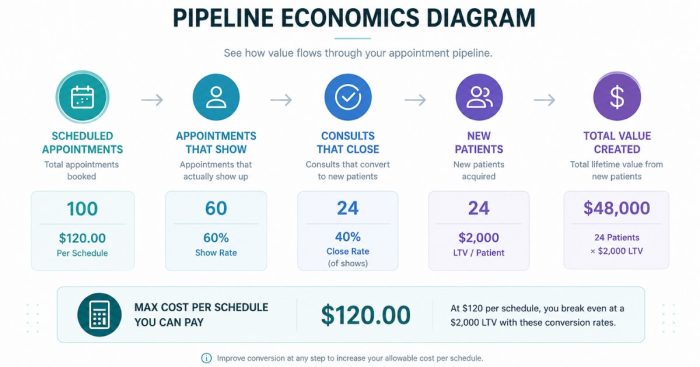
What’s the actual front-desk math when a cash-pay medical practice chases low-quality Facebook leads with a CPL target instead of CPS?
The math is ugly.
A front desk hits a ceiling around 80 to 120 new lead touches per coordinator per day.
Once you exceed that with low-intent Facebook leads:
- Contact rate collapses
- Show rate collapses
- Close rate collapses
All at the same time.
What Actually Happens Inside Real Clinics
Here is what happens in real clinics.
A practice runs Meta ads to a lead form.
Then, CPL drops to $25.
The team celebrates.
However, volume floods in.
Coordinators try to dial every new lead five times in 48 hours, which is the textbook playbook.
Unfortunately, they cannot get through to most people because Facebook lead-form leads on a cold audience are barely awake.
As a result:
- Contact rate drops from 60% to 25%
- Show rate drops from 60% to 35%
- Old leads in the CRM get ignored
- Close rate collapses
Eventually, the team starts arguing about whose fault it is.
Then people quit.
This is the cost-per-lead vs cost-per-schedule KPI trap in action. A campaign can appear successful because it generates inexpensive leads, while simultaneously creating operational chaos that reduces contact rates, show rates, and revenue. The clinics that scale sustainably measure success based on the outcome that matters for the channel, not the cheapest number available in the advertising dashboard.
What Happens When the Same Spend Optimizes for CPS
Now compare that to the same spend optimized toward CPS.
The CPS target is higher in absolute dollars — roughly $180 to $300 depending on the offer.
However, every appointment shows up on the calendar with a credit-card hold.
As a result, the front desk shifts from:
- 100 chase calls per day
to:
- 20 confirmation texts
- A clean morning of consults
Consequently:
- Show rate snaps back to 70%+
- Close rate improves
- Revenue per coordinator hour climbs
- Nobody talks about quitting
Same ad budget.
Completely different practice.
How do you back-solve the right cost-per-schedule for your cash-pay practice from your sales-call show rate and patient LTV?
Back-solve from patient LTV.
First, decide what percentage of LTV you are willing to spend on CAC.
Then, divide by your:
- Show rate
- Close rate
That gives you the maximum cost per schedule you can pay.
The Four-Line Math
The math is four lines:
- Patient LTV — gross revenue from an average patient over their lifecycle
- Target CAC as a percent of LTV — typically 20% to 35% in healthy cash-pay practices
- Show rate — the percent of scheduled appointments that actually show up
- Close rate — the percent of consults that convert to paying patients
Maximum CPS = (LTV x Target CAC %) x Show Rate x Close Rate
Example Calculation
Example:
- $6,000 LTV
- 30% target CAC
That creates:
- $1,800 max CAC
Then:
- Show rate = 70%
- Close rate = 50%
Therefore:
- Max CPS = $1,800 x 0.70 x 0.50 = $630
That is the ceiling.
As a result, your platform CPS target should sit 30% to 40% below that number for margin.
Two Important Operator Notes
First, most clinics overestimate LTV and underestimate it at the same time.
For example:
- They count the membership but forget the labs and GLP-1 refills
- Or they count a single visit and forget the year-long program
Therefore, pull twelve months of real billing data before setting the number.
Second, show rate is the cheapest variable to fix.
A credit-card hold on the scheduling page, an automated SMS sequence the day before, and a personal call the morning of will usually move show rate from 55% to 75%+ inside 60 days.
As a result, the CPS you can afford to pay on Meta rises immediately.
When is cost per BOOKED PATIENT the only KPI that matters — and how do you build the funnel to measure it?
Cost per booked patient becomes the only KPI that matters once your ad spend becomes significant enough that small movements in show rate and close rate dwarf small movements in CPL and CPS.
Typically, that happens somewhere past $25,000 to $50,000 per month in paid media.
At low spend, you optimize for the upstream KPI that matches the platform:
- CPL on Google
- CPS on Meta
At that stage, volume is the bottleneck.
However, past a certain threshold, the bottleneck shifts.
Now the difference between:
- A 55% show rate
- A 75% show rate
can equal six figures per quarter.
As a result, you stop caring about whether a Meta schedule cost $250 or $300.
Instead, you start caring about whether a booked patient cost:
- $1,200
- Or $2,400
That number — cost per booked patient — is what private equity buyers actually underwrite a cash-pay practice on.
Therefore, if you are building toward enterprise value, you should measure it now even if it is not your daily lever.
How to Measure Cost Per Booked Patient Correctly
To measure cost per booked patient cleanly, you need three things tied together.
First: UTM Tracking
Every lead source needs to be UTM-tagged through to the EMR so you can attribute the booked patient back to the campaign.
Second: A Real CRM
You need a real CRM.
Not:
- A spreadsheet
- “The front desk knows”
Instead, you need tracking through:
- Schedule
- Show
- Consult
- Conversion
Third: Weekly KPI Dashboards
You also need a weekly dashboard that shows:
- CPL
- CPS
- Cost per booked patient
side by side for every channel.
We rebuilt exactly this telemetry at a pain-management specialist where we added $40K+ per month and cut insurance dependence in half.
Importantly, the biggest unlock was not a new ad campaign.
Instead, it was finally seeing that:
- Some lead sources looked cheap on CPL but were catastrophic on cost per booked patient
- Other sources looked expensive on CPS but became the most profitable channel in the business
What’s the next step?
First, pick your KPI by platform.
Then, back-solve from LTV — not the other way around.
Platform-by-Platform KPI Rules
On Facebook and Instagram:
- Optimize for cost per schedule
- Only run offers above the $3,000 front-end cash threshold
On Google and YouTube:
- Optimize for cost per lead
- Use funnel layers as quality dials:
- Landing page
- Quiz
- Scheduling page
- Call-only ads
Once you are spending real money on paid media, layer cost per booked patient on top and let it become the deciding number across channels.
Done in that order:
- The math closes
- Your front desk stops drowning
If your cash-pay medical practice is:
- Running paid ads against the wrong KPI for the channel
- Watching the front desk burn out chasing unreachable leads
that is a fixable problem.
In most cases, it is fixable inside 60 days.
The work we did at a pain-management specialist where we added $40K+ per month and cut insurance dependence in half started with rebuilding exactly this scoreboard.
We can do the same audit on your channels and tell you which KPI you should actually optimize against on each one.