
How Do You Track ROAS and Attribute Revenue From Google Ads at a Cash-Pay Clinic?
Most cash-pay clinics that say “Google Ads isn’t working” do not actually have a Google Ads problem — they have an attribution problem.
The dashboard reports conversions, the CRM shows different numbers, the EMR shows different numbers again, and the paying patients who came from a paid ad get tagged as a generic “Google” lead that nobody can trace.
You cannot calculate ROAS on a channel you cannot attribute, and you cannot attribute a channel where the highest-intent buyers call instead of click.
This is the concrete answer — pulled straight from a consulting call where we tore apart a real clinic’s tracking line by line — on how to attribute booked patients and revenue back to Google Ads, what to fix first, and which numbers to actually watch.
Why does my Google Ads dashboard show conversions my CRM never recorded?
Because Google counts a conversion the moment a tracked action fires.
That action might be:
- A form submit
- A phone-call click
- A button tap
Your CRM only counts a person who actually entered your patient management system.
Those two numbers measure different things.
They almost never match.
On one cash-pay clinic’s account, Google reported 85 conversions in the same window the practice could only verify 34 leads.
In that case, 58 of Google’s conversions were attributed to a Performance Max campaign that was most likely firing on an old website form left over from a previous build.
That gap is not a bug.
It is the default behavior of every ad platform.
The platform is optimizing toward an action you told it to count.
If that action is loosely defined or duplicated across stale forms, the conversion number inflates while real patients do not.
The fix is to stop treating the in-platform conversion count as your scoreboard.
Instead, reconcile it against the only number that pays your bills:
Booked, charged patients in your CRM.
Tag every lead with its true source at the point of entry.
Match Google’s conversion timestamps against real records.
Treat any conversion you cannot pair with a patient as unverified.
Google’s number tells you the ad got a click that did something.
Your CRM tells you whether that something became a patient.
That is the number ROAS is built on.
Why can’t I attribute paying patients back to Google Ads even when the source says “Google”?
Because “Google” as a lead source almost always means the patient typed your name into a search bar or phoned you.
It does not automatically mean a paid ad earned them.
When you ask a patient how they heard about you, they genuinely do not know whether they clicked a paid ad or an organic result.
At a cash-pay weight-loss clinic we reviewed, two paying patients in a single month were tagged as source “Google.”
But a check of the CRM showed no form activity for either.
They had called in and booked over the phone, with no way to separate paid from organic.
As the founder put it bluntly when asked whether patients know the difference between a paid ad and an organic listing:
“They have no freaking clue.”
That is the attribution gap that quietly kills paid-ads measurement at clinics.
The highest-intent buyers phone you.
The phone call carries no campaign data.
The generic “Google” tag absorbs both paid and organic into one untrackable bucket.
Patient acquisition is a measurement discipline before it is a spending one, and you can see how the channels fit together on our patient acquisition strategy hub.
To close the gap, you need two things working together:
- A distinct tracking phone number for paid campaigns, so a paid-ad call is labeled automatically.
- A lead-source field that captures the campaign when the lead is created, not a guess your front desk types in three days later.
Until both exist, “source: Google” is not attribution.
It is a shrug.
How do I set up call tracking so phone bookings get attributed to the right Google Ads campaign?
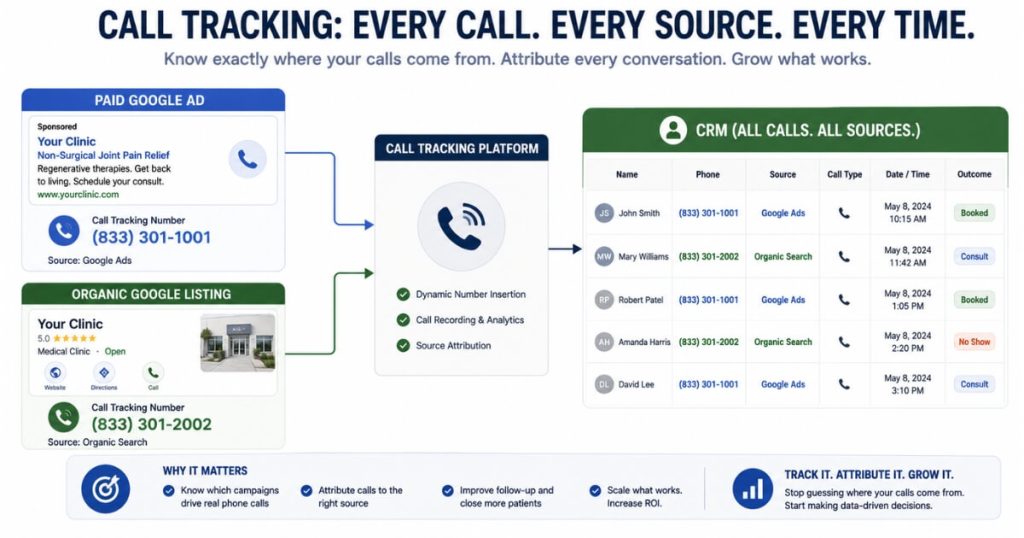
Use a dedicated tracking phone number for each paid channel.
That means one number on your Google Ads and a different number on your organic listings.
This allows every inbound call to be labeled by the source that produced it before anyone picks up.
At a cash-pay clinic, the patients who actually pay are disproportionately the ones who call instead of filling out a form.
That is exactly why so many practices wrongly conclude Google Ads “isn’t working.”
The bookings are real.
But the phone call carries no campaign data.
So they get swallowed by a generic “inbound call” tag and never make it onto the paid-ad ledger.
A call-tracking layer fixes this directly.
It can:
- Swap the number shown on each source dynamically
- Record the call so you can verify caller intent
- Pass the source straight into your CRM
- Place the booking in the right column
Operationally, route new-patient calls to a single trained intake person.
That keeps the data clean and consistent.
When calls scatter across whoever is free, tagging falls apart.
Keep asking the “how did you hear about us” question on the call as a backstop.
But do not rely on it as your primary signal because the answer is usually a guess.
Then reconcile recorded calls against booked appointments every week.
Without call tracking, you are flying blind on the single highest-converting path a cash-pay patient takes.
No spreadsheet of clicks will ever tell you what that path is worth.
Should I watch cost per lead or cost per acquired patient for my Google Ads?
Watch cost per acquired patient.
Cost per lead is the early-warning gauge.
But the patient you actually charge is the only number that proves ROAS.
At one clinic, Google Ads were producing leads at about $35 each.
That was roughly $1,200 of spend across 34 leads.
Not a single one had booked and paid.
The cost per lead looked tolerable.
The cost per acquired patient was effectively infinite.
That is the trap in one line.
A cheap cost per lead can sit right next to a cost per acquired patient that shows the channel is bleeding money.
If you only watch the cheap number, you will keep funding a campaign that has never produced a charged patient.
The discipline is to define a lead as a paying patient, not a form fill.
Then divide total channel spend by patients actually charged from that channel.
Compare that figure against lifetime value before you decide anything.
At this clinic, the average patient was worth roughly $800.
As the consultant noted, when your cost to acquire climbs toward a lifetime value that low:
“That’s not going to feed our families.”
The single biggest lever is often not the ad at all.
If you keep each patient one more month, your effective ROAS rises more than any bid adjustment can deliver.
Cheap leads that never convert are not a bargain.
They are a slow leak with a flattering label.
Is my Google Ads daily budget too low to ever produce a trackable result?
If your daily budget is smaller than your cost per lead, then yes.
The campaign mathematically cannot produce a steady, measurable result.
Google bids and resets daily.
So if your cost per lead is $16 and you are spending $8 a day, the campaign can only afford a lead every other day at best.
You will never accumulate enough conversions to attribute anything with confidence.
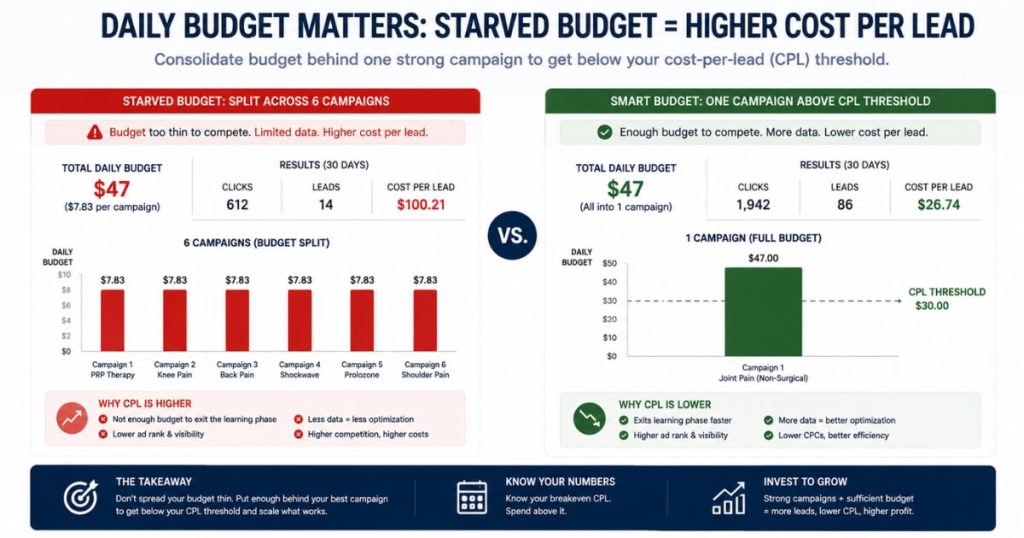
We saw this at a cash-pay clinic running six campaigns at $6 to $8 a day.
That was about $47 a day total.
The budget was split so thin that no single campaign could gather a clean signal.
The starvation was not just inefficient.
It made measurement impossible because there were never enough data points in one campaign to trust.
The rule is simple:
Your daily spend should at least equal your cost per lead.
You should not split a small budget across five or six campaigns.
Instead:
- Consolidate the budget behind one or two campaigns
- Fund each above its cost-per-lead threshold
- Let conversions accumulate
- Review attribution after enough data exists
Only then will your attribution data be trustworthy enough to make a real decision.
If after a fair test at a real budget the channel still produces no charged patients, that is a legitimate signal to turn it off and redeploy the spend.
At this clinic, that meant roughly $1,500 a month freed up for a channel that could actually be tracked.
How do I clean up lead-source tracking when my CRM and EMR disagree?
Pick one system as the source of truth for revenue.
Tag every lead at the moment it is created rather than after the fact.
Stop letting consolidation blur the difference between a new lead and an existing-patient appointment.
At one clinic, the CRM showed 52 booked appointments against only 18 website leads.
That contradiction prompted the consultant to say:
“I don’t understand this tracking at all.”
The cause was mundane and extremely common.
The 52 counted reception-entered appointments and existing-patient visits as if they were fresh leads.
The 18 counted only website form submissions.
As he summed it up:
“By trying to consolidate, we made it harder to figure out.”
When every appointment from every source pours into one bucket, you lose the ability to tell which marketing dollar produced which patient.
Clean tracking starts upstream.
Route website bookings through one form that writes a true source into the CRM automatically.
Add a tracking number so phone leads carry their source.
Remove any orphaned forms still firing on old blog pages.
Then reconcile three counts every week:
- Your CRM lead count
- Your EMR booked-and-charged count
- Your ad-platform conversion count
They will never match perfectly.
That is fine.
The gaps are the point.
They show where leads are leaking and which source is actually producing patients.
What should I actually watch each week to know if Google Ads is producing ROAS?
Watch four numbers in order:
- Verified leads by true source
- Booked appointments
- Patients seen and charged
- Cost per acquired patient against lifetime value
Everything else is noise.
Raw clicks, impressions, and the platform’s self-reported conversion count are early signals.
They are not proof.
The clinics that scale are ruthless about the full funnel.
At one practice, the month showed:
- 108 new leads
- 52 booked
- 35 seen
- 30 charged
That is a strong close rate once a patient actually showed up.
But it also reveals an obvious leak between booking and showing.
No amount of ad spend will fix that.
Tracking the funnel weekly by source shows whether Google Ads is feeding the top of it or just inflating a vanity number.
Then close the loop with lifetime value.
The patient you retain for one more month improves ROAS more than any bid tweak.
The mindset matters as much as the metrics.
Be a data person, not an opinion person.
But do not wait for perfect tracking to start, because some data is better than no data.
This is the same measurement discipline behind the wins we publish, like an orthopedic surgical center that added $2M in revenue from Facebook ads and a wellness medspa that scaled to $6.7M a year across multi-channel paid ads.
Neither happened because the ads were clever.
They happened because the attribution was clean enough to know where to push.
FAQ’s About Tracking ROAS From Google Ads
Why does my Google Ads dashboard show conversions my CRM never recorded?
Because Google counts a conversion the moment a tracked action fires.
That action may be:
- A form submit
- A phone-call click
- A button tap
Your CRM only counts a person who actually entered your patient management system.
Those two numbers measure different things.
They almost never match.
On one cash-pay clinic’s account, Google reported 85 conversions in the same window the practice could only verify 34 leads.
The fix is to stop trusting the in-platform conversion count as your scoreboard.
Reconcile it against the only number that pays your bills:
Booked, charged patients in your CRM.
Tag every lead with its true source at the point of entry.
Match Google’s conversion timestamps against real records.
Treat any conversion you cannot find a matching patient for as unverified.
Why can’t I attribute paying patients back to Google Ads even when the source says “Google”?
Because “Google” as a lead source usually means the patient typed your name into a search bar or called you.
It does not automatically mean a paid ad earned them.
Patients often do not know whether they clicked a paid ad or an organic result.
That creates an attribution gap.
To close it, use:
- A distinct tracking phone number for paid campaigns
- A lead-source field that captures the campaign at lead creation
Without those, “source: Google” is not attribution.
It is a guess.
How do I set up call tracking so phone bookings get attributed to the right Google Ads campaign?
Use a dedicated tracking phone number for each paid channel.
Use one number on Google Ads.
Use a different number on organic listings.
That way, every inbound call is labeled by source before anyone answers.
A call-tracking layer can:
- Dynamically swap phone numbers
- Record calls
- Verify caller intent
- Pass source data into your CRM
Route new-patient calls to a single trained intake person so the data stays clean.
Then reconcile recorded calls against booked appointments every week.
Should I watch cost per lead or cost per acquired patient for my Google Ads?
Watch cost per acquired patient.
Cost per lead is an early-warning gauge.
But the patient you actually charge is the only number that proves ROAS.
A campaign can produce cheap leads and still lose money if none of those leads become paying patients.
Calculate cost per acquired patient by dividing total channel spend by patients actually charged from that channel.
Then compare it to lifetime value.
Is my Google Ads daily budget too low to ever produce a trackable result?
If your daily budget is smaller than your cost per lead, yes.
The campaign cannot produce a steady, measurable result.
For example, if your cost per lead is $16 and your budget is $8 a day, the campaign can only afford a lead every other day.
That is not enough data to trust.
Consolidate small budgets into one or two campaigns.
Fund each above its cost-per-lead threshold.
Then let conversions accumulate before judging performance.
How do I clean up lead-source tracking when my CRM and EMR disagree?
Pick one system as the source of truth for revenue.
Then tag every lead when it is created, not after the fact.
Clean tracking requires:
- One website form that writes source into the CRM
- Tracking numbers for phone leads
- Removal of orphaned old forms
- Weekly reconciliation across CRM, EMR, and ad-platform data
The numbers will never match perfectly.
But the gaps show where the tracking is broken.
What should I actually watch each week to know if Google Ads is producing ROAS?
Watch these four numbers:
- Verified leads by true source
- Booked appointments
- Patients seen and charged
- Cost per acquired patient against lifetime value
Clicks, impressions, and self-reported conversions are early signals.
They are not proof.
ROAS is proven only when paid traffic becomes charged revenue.