
How Should a Cash-Pay Practice Evaluate a New EMR? (The 15-Minute Demo Checklist We Ran on Cerbo)
Most EMRs are built around insurance billing — claims, codes, clearinghouses. If you run a cash-pay practice, you’re paying for machinery you’ll never use while the features you actually need get treated as add-ons. We recently sat through a Cerbo demo for a direct primary care practice (hormones, weight loss, primary care, sick visits) plus a virtual urgent care business — and ran the whole evaluation in about 15 minutes. Here’s the exact checklist, the pricing mechanics, and the migration traps.
Why would a cash-pay practice switch EMRs at all?
Usually because the billing and reporting were designed for insurance.
For a 100% cash-pay practice, those tools are often inadequate.
That was the exact trigger here.
The practice had already submitted its cancellation notice to Elation because the billing and billing reporting couldn’t do what a cash-pay operation needed.
By the time the demo happened, billing had already been rebuilt inside the CRM using GoHighLevel subscriptions and products.
As a result, the shopping list changed completely.
The new EMR no longer needed to be a billing solution.
Instead, it needed to focus on clinical operations.
That’s the first lesson.
Before you schedule a demo, decide which jobs the EMR must perform.
Then identify which jobs already live elsewhere in your technology stack.
A cash-pay practice that runs payments, subscriptions, and patient communication through its CRM doesn’t need another billing platform.
Instead, it needs a clinical system that handles:
- Charting
- Scheduling
- Labs
- Prescriptions
Otherwise, you’ll end up paying for another half-built billing module you’ll never use.
What should I check in an EMR demo for a cash-pay practice?
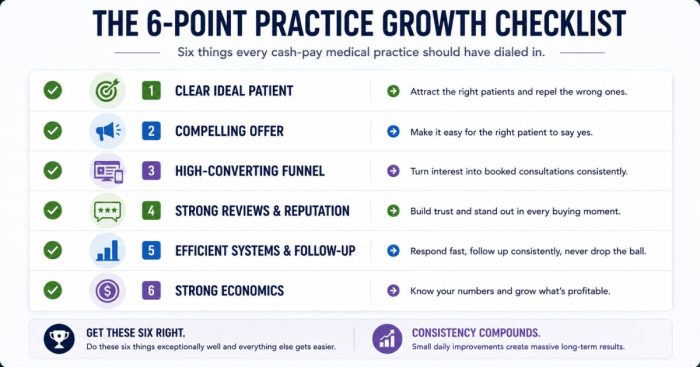
Focus on six things.
If you begin the meeting with a complete brain dump of your requirements instead of letting the sales representative control the conversation, you can evaluate all six in about 15 minutes.
Here’s the checklist we used during the Cerbo demo.
1. New-patient self-scheduling
Can a brand-new patient—with no account and no portal login—book directly from your website?
Cerbo’s answer was yes.
Its embedded scheduler supports multiple locations.
If new patients can’t self-book, your advertising traffic dies at a contact form.
2. Open, two-way API
You don’t necessarily need a native GoHighLevel integration.
Instead, an open API that allows you to both push and pull data is enough for a development team to connect the systems.
Ask specifically whether the API is truly two-way.
Sales representatives often don’t know the answer.
Therefore, have the development team confirm it in writing.
3. Patient portal for labs
Patients should be able to upload and download their own laboratory results without asking your staff.
Cerbo’s patient portal includes:
- Lab results
- Encounter summaries
- Secure messaging
- Forms
The vendor can also hide modules you don’t use.
4. Form builder
Cerbo includes a built-in custom form builder.
More complex forms created by the vendor carry an additional fee.
During this demo, the quoted range was approximately $200–$300, depending on form length.
It was not $500.
5. Telemedicine
Cerbo includes native video visits.
However, those visits are not recorded.
If you need recordings, you’ll need to use the Zoom integration and save the meeting link.
Know which workflow your compliance requirements demand before the demo begins.
6. eFax
It isn’t exciting.
However, it’s still necessary.
Confirm whether inbound eFax is included or billed separately.
Does the EMR need to integrate directly with my CRM?
No.
A two-way open API is more valuable than waiting for a native integration.
The division of responsibility that works well for cash-pay practices is straightforward.
The CRM should handle:
- Patient communication
- Pipelines
- Billing
Meanwhile, the EMR should manage:
- Charting
- Prescriptions
- Laboratory results
- Scheduling
With that structure, you don’t need the EMR vendor to build a native GoHighLevel integration.
Instead, you need:
- API credentials
- Good documentation
- Confirmation that data can move in both directions
Many practices have already built that connection themselves.
This matters for growth as much as operations.
Your patient acquisition engine lives inside the CRM.
That’s where your:
- Speed-to-lead
- Follow-up sequences
- Pipeline visibility
all operate.
Those critical functions should never depend on whatever communication tools an EMR happens to include.
What does EMR pricing actually look like for a small cash-pay team?
Most EMRs charge per provider.
However, many also offer separate pricing for full-time and part-time providers.
Most owners never think to ask.
Cerbo requires one full-time provider license on every account.
After that, providers working fewer than 30 hours per week can qualify for lower-cost part-time licenses.
That information was confirmed—loosely—using Cerbo’s own calendar.
For the practice in this demo, the staffing looked like this:
- One full-time provider
- Two part-time providers
- Two part-time administrative users
If your providers work fewer than 30 clinical hours each week—as many cash-pay providers do—the part-time tier can produce meaningful savings.
Ask for it.
The patient portal carries separate pricing based on active-patient brackets.
For example:
- About $75 per month for up to 1,000 active patients
- Higher pricing above that threshold
One simple tactic helps keep costs lower.
Run an annual report.
Then mark patients who haven’t been seen in the past 12 months as inactive.
Also, pay attention to seasonal promotions.
During this demo, a Black Friday promotion reduced:
- Setup fees to $1
- Data import fees to $1
- Three months of add-on packages at no additional charge
Timing your migration around a vendor’s promotional calendar can easily save thousands of dollars.
How painful is migrating patient data from my old EMR?
Usually, it’s less painful than the horror stories suggest.
However, scope it with a report instead of a guess.
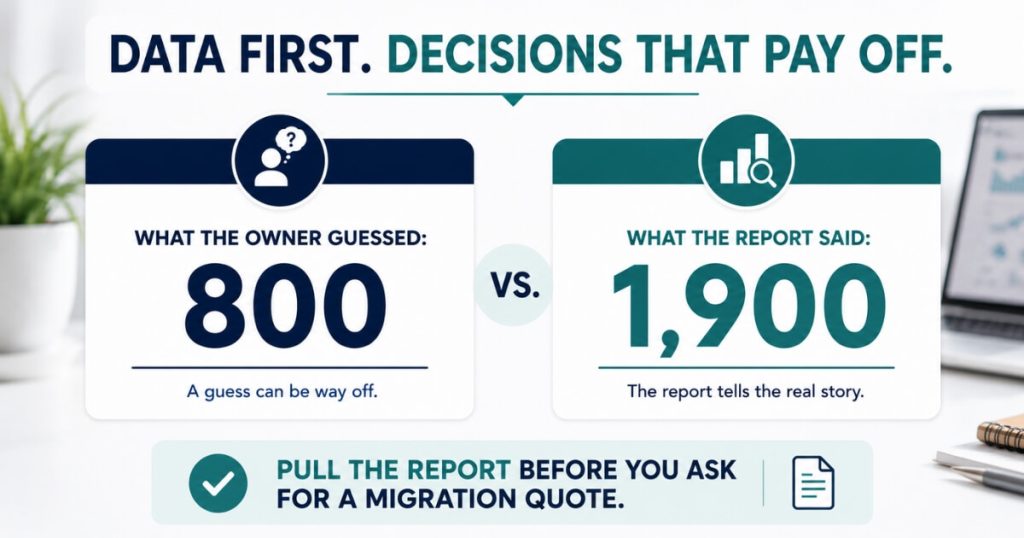
During this demo, the owner estimated the practice had about 800 patients to migrate.
Then the live patient-list report told a different story.
The actual count was 1,900 patients.
That’s more than double the estimate.
Migration quotes, patient portal pricing, and implementation timelines all depend on that number.
Therefore, pull the real report before requesting an estimate.
Don’t wait until after you’ve signed.
Next, understand exactly what data will transfer.
Cerbo’s data team can migrate virtually everything from Elation, including:
- Demographics
- Calendars
- Past medical history
- Documents
- Prescriptions
- Face pages
- Specialists
- SOAP notes
- Allergies
- Photos
- Handouts
- Messages
- Family history
- Pharmacy information
- Free-text histories
- Tags
Always get that list in writing from every vendor you evaluate.
The phrase “we migrate your data” can mean very different things.
For one vendor, it may only include a demographics CSV.
For another, it may include your complete chart history.
At that scale, losing chart history or breaking scheduling isn’t a minor inconvenience.
It’s a revenue event.
What scheduling detail should I demand before signing?
Ask for calendar-first booking.
Patients should choose a time before entering their information.
Hidden inside this demo was one of the highest-impact conversion questions you can ask an EMR vendor.
Can the embedded scheduler display available appointment times first?
We’ve consistently seen stronger booking rates when patients select their appointment before filling out forms.
Once someone chooses “Tuesday at 2:15,” they’ve already made a decision.
After that, entering their:
- Name
- Phone number
- Intake information
simply becomes follow-through.
The opposite sequence creates more opportunities to abandon the booking.
Many schedulers follow this order:
- Provider
- Appointment type
- Form
- Calendar
If the vendor can’t change that sequence, weigh it carefully against every other feature.
After all, your scheduler determines whether your marketing investment becomes a booked patient.
Or doesn’t.
FAQ’s About Choosing an EMR for a Cash-Pay Practice
What’s the best EMR for a cash-pay or direct primary care practice?
Choose the EMR that performs clinical work well while staying out of the way of your CRM.
Compare Cerbo, Elation, and other platforms using six cash-pay-specific requirements:
- New-patient self-scheduling
- A two-way open API
- A patient lab portal
- A form builder
- Telemedicine that matches your recording requirements
- eFax
Avoid paying for insurance billing features you’ll never use.
Should my EMR handle billing at a cash-pay practice?
Usually not.
Insurance-focused billing modules and reporting are often inadequate for 100% cash-pay practices.
That limitation is exactly why the practice in this article left Elation.
Instead:
- Run payments through your CRM.
- Manage subscriptions through your CRM.
- Handle memberships through your CRM.
Then let the EMR focus on clinical care.
How do I keep EMR per-provider pricing down?
Ask whether part-time licensing is available.
For example, Cerbo requires one full-time provider license.
However, providers working fewer than 30 hours per week can qualify for lower-cost part-time licenses.
Many cash-pay practices can structure three providers as:
- One full-time provider
- Two part-time providers
Also, look for vendor promotions.
During this evaluation, a seasonal promotion reduced both setup and data migration to $1 each.
What patient data transfers when you switch EMRs?
Potentially all of it.
However, always get the migration list in writing.
A comprehensive migration should include:
- Demographics
- Calendars
- SOAP notes
- Prescriptions
- Allergies
- Documents
- Photos
- Messages
- Family history
- Pharmacy data
- Tags
Also, begin with an actual patient report.
In this demo, the owner estimated 800 patients.
The live report revealed 1,900.
Why does calendar-first booking order matter in an EMR scheduler?
Because booking rates improve when patients select an appointment time before entering their information.
Choosing a time creates commitment.
The intake form simply completes that commitment.
When forms appear first, every additional field becomes another opportunity to leave.
Ask whether the embedded scheduler allows you to change the booking sequence.
Treat the answer as a conversion issue.
Not a cosmetic one.
What’s the next step?
If your EMR was built for insurance claims while your practice runs entirely on cash, you’re likely paying for the wrong software.
You may also be losing bookings before patients ever complete the scheduler.
Book a strategy call.
In 60 minutes, we’ll map your technology stack the same way we do for our client practices.
Together, we’ll determine:
- What belongs inside the CRM
- What belongs inside the EMR
- Which of the six demo checks your current system fails
- Whether migrating right now is worth the disruption
We sit through vendor demos so our clients don’t have to make decisions blindly.
You shouldn’t either.